While choosing between an Online UPS and Offline UPS, it's not simply about picking the model with a higher VA rating. The right UPS depends on the equipment you want to protect, the quality of your electricity supply, how often power cuts happen, and how much backup and power protection you actually need.
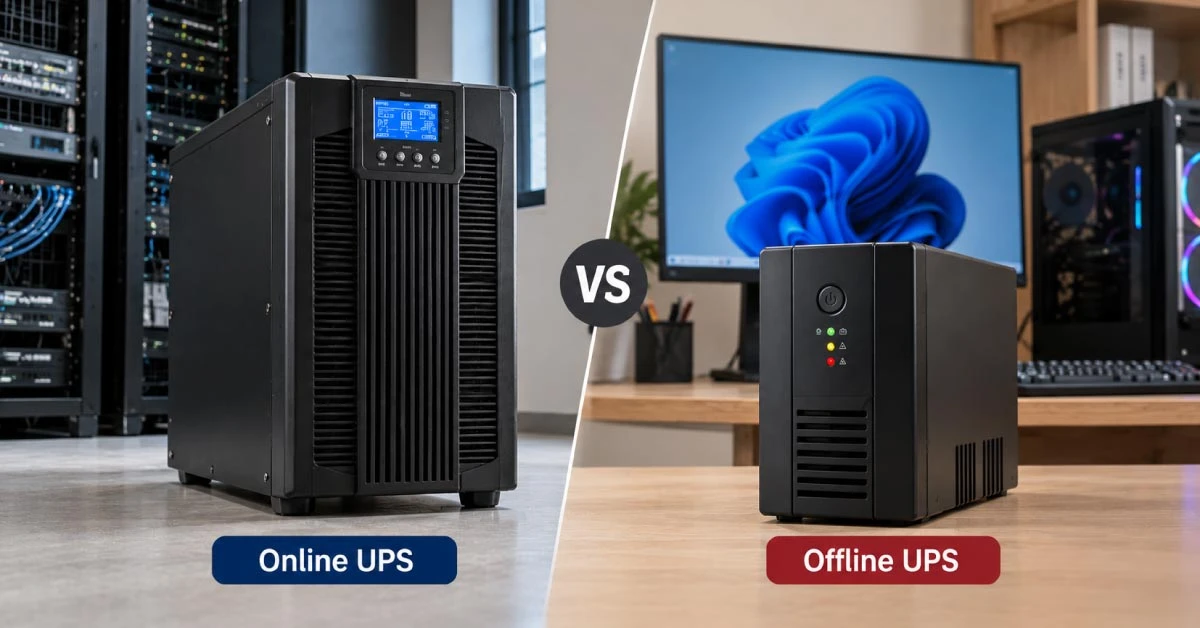
An Offline UPS, also called a Standby UPS, is generally designed for basic battery backup and protection during power cuts. But an Online UPS uses a double-conversion design to provide continuous conditioned power with zero transfer time.
However, in this guide, we’ll discuss the Online UPS vs Offline UPS difference, how both work, and which type makes sense for PCs, gaming setups, offices, servers, networking equipment, and other electronics.
Online UPS Vs Offline UPS: Comparison Table
Feature
Offline UPS
Online UPS
Basic design
Standby/battery backup
Double-conversion
Normal power path
Utility power normally goes to the load
AC is converted to DC and then back to AC
Transfer time
Has a switching delay
Zero transfer time
Voltage regulation
Depends on model; basic units may offer limited regulation
Continuous and more precise regulation
Voltage fluctuation protection
Basic to moderate, depending on model
Stronger protection
Power conditioning
Limited
Strong
Efficiency
Generally higher in normal operation
Generally lower than basic standby designs, although newer models may offer ECO modes
Heat and noise
Usually lower
Usually higher, depending on model
Cost
Lower
Higher
Best suited for
Home PCs, basic electronics, short outages
Servers, critical IT equipment, sensitive electronics, unstable power
The biggest practical difference between these two is how power reaches your equipment. An Offline UPS normally lets utility power pass through and switches to battery when the power fails.
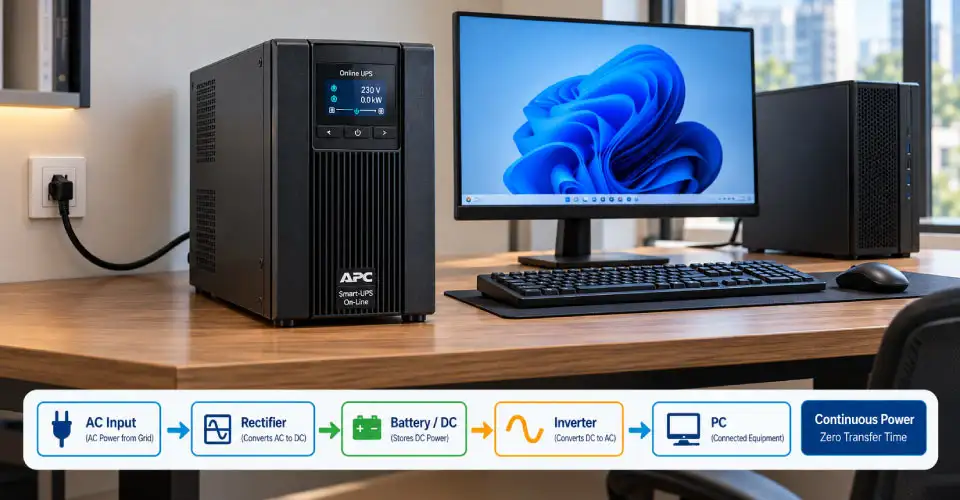
On the contrary, an Online UPS continuously processes the incoming electricity through its rectifier and inverter, so the connected equipment is already receiving power from the UPS output when the mains fails. This is why an Online UPS can provide zero transfer time.
How an UPS Works
A UPS, or Uninterruptible Power Supply, provides temporary battery power when the main electricity supply fails. It can also provide some level of surge protection, voltage regulation, and power conditioning depending on its design.
The main components include the inverter, battery, charging system, and control electronics. The inverter converts DC battery power into AC power that your devices can use.
The important point is that not every UPS processes electricity in the same way. This is where Online UPS, Offline UPS, and Line-Interactive UPS differ.
How an Online UPS Delivers Continuous Power
An Online UPS uses double-conversion technology. First, a rectifier converts incoming AC power into DC. The inverter then converts it back into AC for connected equipment. Because the inverter continuously supplies the load, the UPS does not need to switch to battery when mains power fails.
This provides zero transfer time. It also helps provide stable output voltage and better protection from voltage fluctuations and other power-quality problems.
How an Offline UPS Switches to Battery Backup
An Offline UPS normally supplies equipment directly from utility power. When the mains fails or moves outside its operating range, it switches the load to the inverter and battery. This creates a short transfer time, which varies by model.
Many home and office devices can handle this delay. Do not confuse it with a Line-Interactive UPS, which uses Automatic Voltage Regulation (AVR) to correct some voltage fluctuations without immediately using battery power.
Online UPS vs Offline UPS: Which One Should You Choose?
The better option depends on what you are protecting.
An Offline UPS is useful when your main goal is to keep a home computer, monitor, router, or other basic electronics running long enough to save work and shut down safely.
In contrast, an Online UPS becomes more relevant when equipment cannot tolerate even a brief transfer, when voltage quality is a major concern, or when downtime could cause a significant operational problem.
What Transfer Time Means in Real Use
Transfer time is the short delay an Offline or other non-online UPS takes to switch from mains power to battery power. An Online UPS has zero transfer time because its inverter continuously supplies the connected equipment.
A short transfer may be acceptable for many desktop PCs, but the result depends on the UPS, PC power supply, load, and other factors. So, do not judge a UPS only by VA capacity. Check its transfer characteristics and output waveform to ensure it suits your equipment.
Which UPS Handles Voltage Fluctuation Better?
Voltage fluctuation is particularly relevant when the mains supply frequently moves above or below its normal voltage. A basic Offline UPS primarily provides backup when the power fails. It may not provide continuous voltage correction while mains power is available.
A Line-Interactive UPS with AVR can correct certain voltage fluctuations without switching to battery. An Online UPS goes further by continuously converting the incoming AC power to DC and then back to AC. Eaton states that online UPS systems provide more precise output regulation and stronger protection against abnormal input voltage.
For Bangladesh users who experience frequent voltage fluctuation, this difference matters. If your area has relatively stable electricity and your main concern is short power cuts, an Offline UPS may be sufficient. If voltage quality is consistently poor, consider whether AVR or Online double-conversion protection is worth the additional cost.
Online UPS vs Offline UPS During Frequent Load Shedding
Frequent load shedding changes the buying decision because the UPS may switch to battery many times in a day.
With an Offline UPS, repeated power interruptions can cause repeated switching between mains and battery. If the unit also lacks AVR, voltage fluctuations may make the situation more demanding.
An Online UPS continuously supplies the load through its inverter, so there is no transfer delay each time the input power fails. This makes it more suitable for equipment that must remain continuously powered.
However, Online UPS does not automatically mean longer backup time. Backup time depends mainly on battery capacity, connected load, and UPS design. A high-capacity Offline UPS with a suitable battery can provide longer runtime than a smaller Online UPS.
Pure Sine Wave vs Online and Offline UPS
Pure sine wave and UPS topology are two different things. Online UPS systems generally provide a clean sine-wave output, but an Offline or Line-Interactive UPS can also be available with pure sine-wave output. Therefore, choosing between Online and Offline should not replace checking the waveform.
This matters especially for computers with Active Power Factor Correction (PFC) power supplies. CyberPower notes that sine-wave UPS systems are designed for compatibility with equipment using Active PFC, while simulated sine-wave output can cause compatibility problems with some devices.
For a gaming PC, workstation, or other sensitive equipment, check both UPS topology and output waveform before buying.
Online UPS vs Offline UPS for Gaming PCs
Gaming PCs can place a heavier load on a UPS, especially when a powerful GPU and CPU are running at the same time. For a gaming setup, check:
Total power consumption in watts
UPS VA and watt capacity
Transfer time
Output waveform
PSU compatibility
Battery runtime
Power spikes and peak load
Number of connected devices
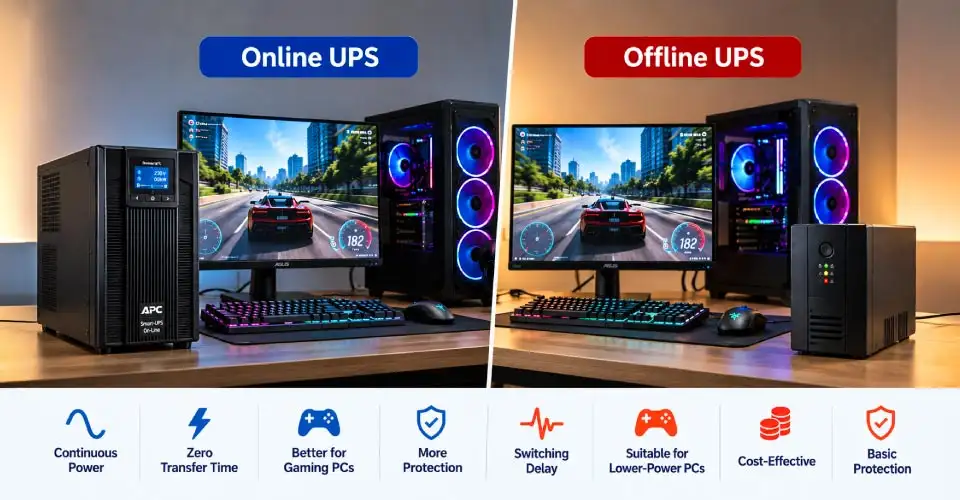
A basic Offline UPS may be suitable for a lower-power gaming PC if its capacity, waveform, and transfer characteristics are compatible with the system.
For a high-end gaming PC, an Online UPS can provide additional protection from voltage problems and zero transfer time. However, the added cost and higher power consumption of the UPS itself may not be worthwhile for every gamer. A pure sine wave output can also be important for systems using Active PFC power supplies.
Online UPS vs Offline UPS for Servers and Networking Equipment
Servers, NAS devices, networking equipment, and other critical IT systems usually have a stronger need for continuous power than a typical home PC.
A brief interruption may cause a device to restart, interrupt network services, or result in an incomplete operation. For such equipment, the zero transfer time of an Online UPS can be an important advantage.
Online UPS systems are commonly positioned for mission-critical equipment and environments where utility power is poor or unreliable.
For a home router or small networking setup, however, buying a large Online UPS may be unnecessary. A smaller UPS can be enough if your main goal is keeping the network running during short outages.
Online UPS and Offline UPS Backup Time
Backup time depends on the battery capacity and connected load, not simply whether the UPS is Online or Offline.
For example, a UPS supporting a lightly loaded router may run much longer than the same UPS supporting a power-hungry gaming PC.
When comparing models, check:
Battery voltage and Ah rating
Total connected wattage
Expected runtime at that load
Whether additional batteries are supported
Recharge time
Do not assume that a 2000VA UPS will automatically provide twice the runtime of a 1000VA model. Battery configuration and actual load also matter.
Efficiency, Heat, and Noise Comparison
An Offline UPS usually has a simpler power path during normal operation, so it can be more efficient and generate less heat and noise.
An Online UPS continuously runs the double-conversion process, which can increase energy consumption and heat output. Fans may also run more frequently, particularly in higher-capacity models.
Some modern Online UPS systems include ECO mode, which can reduce energy use when input power quality is acceptable. For a bedroom PC or small home office, noise and heat may therefore be practical considerations. For a server room, stronger power protection may be more important than these disadvantages.
Online UPS vs Offline UPS: Cost vs Long-Term Value
Price is one of the clearest differences between the two types. Ryans currently lists Offline UPS models starting at roughly Tk 3,400–3,700, while Online UPS models can start around Tk 20,500 and increase substantially with capacity and battery configuration.
For example, the current Ryans listing includes a MARSRIVA 650VA Offline UPS at Tk 3,700, a 1000VA MARSRIVA Online UPS at Tk 20,500, and larger Online UPS models at much higher prices.
However, the higher price of an Online UPS can make sense when it protects expensive servers, networking equipment, workstations, or other equipment where downtime or power-quality problems have a high cost.
For a basic home PC, paying several times more for an Online UPS may not provide enough practical benefit to justify the difference.
When Should You Upgrade to an Online UPS?
An upgrade may be worth considering when your current Offline UPS no longer matches your needs.
Consider moving to an Online UPS if:
Your equipment is highly sensitive to power interruptions.
You experience frequent or severe voltage fluctuation.
Your PC or workstation occasionally restarts during power cuts despite having enough UPS capacity.
You operate servers, NAS systems, or important networking equipment.
Downtime or unexpected shutdowns could cause significant business problems.
You need zero transfer time and stronger power conditioning.
Before upgrading, however, check whether the real problem is undersizing, poor battery health, unsuitable waveform, or lack of AVR. Replacing an Offline UPS with an Online model is not always the first solution.
Online UPS vs Offline UPS: Which One Should You Choose?
For basic home use, an Offline UPS can be a practical choice when you mainly need battery backup during power cuts and your equipment can tolerate the short transfer time.
A Line-Interactive UPS with AVR can be a middle option when voltage fluctuation is also a concern but full Online double-conversion protection is unnecessary.
On the other hand, an Online UPS is more appropriate when you need zero transfer time, stronger voltage regulation, continuous power conditioning, or protection for critical equipment.
The final choice should therefore depend on equipment sensitivity, load, voltage conditions, required backup time, waveform, and budget rather than the UPS type alone.
FAQs
Is the transfer time of an Offline UPS fast enough for a modern gaming PC?
It can be, but compatibility depends on the specific UPS and PC power supply. A short transfer does not automatically mean a gaming PC will shut down, but systems using sensitive or Active PFC power supplies should also be checked for waveform compatibility. Pure sine-wave UPS models can be a safer choice for compatible sensitive equipment.
Why does my PC restart during a power cut even though the UPS has enough VA capacity?
VA capacity is only one part of UPS selection. The problem could involve transfer time, actual watt load, battery condition, output waveform, or an unsuitable UPS design. Check the PC's real power consumption and the UPS's watt capacity, not just its VA rating.
Can frequent low voltage repeatedly trigger or affect an Offline UPS?
Yes. Depending on its design and operating range, an Offline UPS may switch to battery when input voltage falls outside its acceptable range. Frequent switching can increase battery usage. A Line-Interactive UPS with AVR or an Online UPS can provide better handling of voltage fluctuations.
Can both Online and Offline UPS systems work with generators?
Yes, but compatibility depends on the UPS and generator. Check the UPS manufacturer's requirements for generator frequency, voltage stability, waveform, and operating range before connecting them.
Is a pure sine wave output more important than choosing Online or Offline UPS?
They are different considerations. UPS topology determines how the unit handles incoming power and transfers to battery, while waveform describes the output power. For some computers and Active PFC power supplies, pure sine wave output can improve compatibility.
Can an Offline UPS handle sudden GPU power spikes when gaming?
It depends on the UPS's watt capacity, battery condition, output waveform, and the PC's actual power demand. A UPS that is close to its maximum load may have less headroom for sudden increases. For a gaming PC, leave adequate capacity instead of choosing a UPS based only on the GPU's rated power.















Leave a comment