On this page 12 sections
What matters most
- Check the back row. Can people read the smallest text at their actual seating distance?
- Account for the room light. Panels can reflect windows; projected images can lose contrast in bright rooms.
- Price the complete setup. Screens, mounts, OPS, cabling and maintenance can change the total cost.
Quick Answer: Interactive Panel or Projector?
FOR TOUCH & PARTICIPATION
Interactive panel
Choose an interactive panel if you need touchscreen writing, annotations, collaboration, and easy daily operation.
FOR LARGE-SCREEN VIEWING
Projector
On the other hand, choose a projector if you need a larger image for a big audience or want to keep the initial display cost lower.
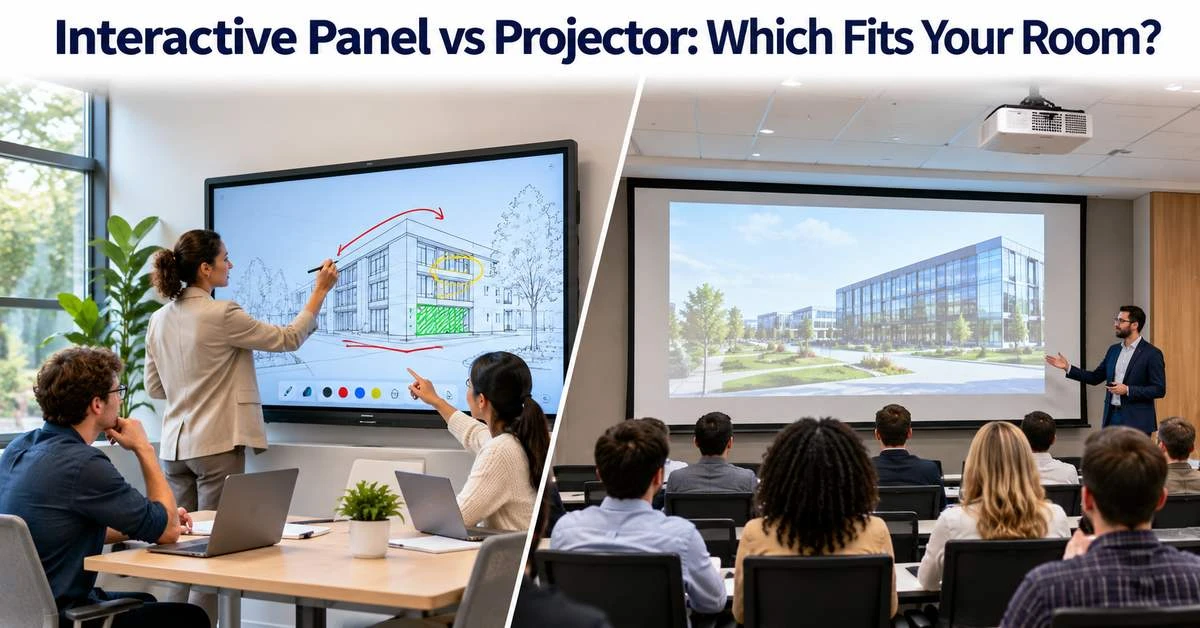
Neither is automatically better. A small coaching room may benefit from a 65-inch interactive flat panel, while a lecture hall needs a projector with a much larger image.
How an Interactive Panel and Projector Differ
Direct-View Touch Display vs Projected Image
On an interactive flat panel (IFP), also called an interactive display or digital whiteboard, you can open a presentation, write notes over a slide, highlight details, and move objects directly on the screen. It is useful for classrooms, training sessions, and meetings where people need to work through ideas together.
A projector is more suitable when you need to show content on a larger surface. It can display slides, videos, spreadsheets, and other visuals on a wall or screen. This makes it practical for larger rooms or presentations with many viewers.
Standalone Smart Features vs Connected Presentation Setup
Many interactive panels include an operating system, such as Android, for whiteboarding, apps, and basic content use without a laptop. Depending on the model, connectivity includes Wi-Fi, Bluetooth, HDMI, USB, and wireless screen sharing.
An optional OPS (Open Pluggable Specification) module lets you add a Windows-based computing system to a compatible interactive panel. This can be useful if you need Windows applications instead of relying only on the panel's built-in Android system.
Other features, such as a camera, microphone, and speakers, vary by model and may require separate accessories.
Interactive Panel vs Projector Comparison
| Features | Interactive Panel | Projector |
|---|---|---|
| Interaction style | Direct touch and on-screen writing | Usually controlled through a connected device or remote |
| Audience size | Best when viewers can comfortably see the panel | Suitable for displaying content to large audiences |
| Installation flexibility | Requires suitable wall or stand space | Offers flexibility in image size and placement |
| Group participation | Supports hands-on activities and shared annotations | Works well for presenter-led sessions |
| Setup requirements | Requires power and, depending on the model, connected devices | May require a screen, suitable projection distance, and controlled lighting |
| Long-term considerations | Consider panel lifespan, software support, and repair costs | Consider lamp or light-source lifespan, filter cleaning, and maintenance |
Which Is Better for Teaching and Coaching?
Writing, Annotation and Student Interaction
For teachers who regularly solve problems on-screen, explain diagrams, or annotate lesson materials, an interactive panel makes teaching more convenient. It is particularly useful for mathematics, science, and coaching sessions where teachers need to demonstrate each step.
When choosing an interactive panel for a classroom or coaching center, consider screen size, writing comfort, anti-glare features, and compatible teaching software. A digital board for classroom use is worth the investment when teachers will use these tools regularly rather than mainly displaying prepared slides.

Hikvision DS-D5C65RB/B2L 65-inch Interactive Flat Panel
This model has a 4K touchscreen with 50-point touch support, a built-in camera, and an 8-array microphone. Teachers can write directly over lessons and use the same display for online or hybrid classes. Its 65-inch size makes more sense for smaller classrooms where students sit close enough to read the screen.
Slides, Videos and Lecture-Style Teaching
A projector is suitable when teachers mainly present slides, diagrams, recorded lessons, and videos. It can display a large image without requiring an equally large flat-panel display.
A projector can be practical for classrooms or coaching centers where several rows of students need to see the same content. However, check brightness, native resolution, and viewing distance to ensure that text remains readable.

BenQ MX560C 4000 Lumens XGA Business Projector
This model is a practical option for showing lesson slides, question papers, and presentations in a classroom. Its 4000-lumen brightness and HDMI connection suit regular laptop-based teaching. However, it has a native XGA resolution of 1024 x 768, so check text readability if you frequently display detailed spreadsheets or small text.
Which Is Better for Office and Meeting Rooms?
Team Collaboration and Whiteboarding
An interactive panel suits teams that brainstorm, edit documents, annotate presentations, or discuss plans directly on screen. Some models support wireless casting and video meetings, while others may require additional software or conferencing equipment.
Presentations and Large-Audience Viewing
A projector can work well for reports, training presentations, and conference slides viewed by a large group. A projector for meeting room use should have enough brightness for the room's lighting and suitable connections for presenters' laptops.
Room Size and Audience Distance Matter
Small Classroom or Meeting Room
A 65-inch interactive panel may suit a small room where viewers sit close to the screen. It also saves the space needed for a separate projector and screen.
Medium Classroom or Training Room
For medium-sized rooms, compare a 75-inch or 86-inch panel with a projector based on seating distance and content visibility.
Large Classroom, Seminar or Lecture Hall
A projector is often more practical when people sit far from the display because its image can scale much larger.
How Room Light Changes the Decision
Interactive Panel Visibility and Glare
Interactive panels generally remain clear under normal room lighting, but reflections from windows and overhead lights can cause glare. Check the anti-glare finish and panel placement, especially when students need to read detailed content.
Projector Brightness, Screen and Ambient Light
Projector visibility depends on brightness (ANSI lumens), image size, screen surface, and room lighting. Strong ambient light can reduce contrast, so choose a projector suited to the room.
Also compare native resolution, not just supported input. A 4K UHD panel has a native resolution of 3840 x 2160, while a projector that accepts a 4K signal may display at a lower native resolution.
Screen Size Also Matters
65-inch panels may suit smaller rooms, while 75-inch and 86-inch models offer more viewing space. For larger lecture halls, a projector can provide a much bigger image, so compare viewing distance, resolution, available space, and total installation cost before deciding.
Installation and Daily Use
Panel Wall Mount or Trolley
An interactive panel needs a suitable wall mount or trolley. A movable panel trolley can help when the screen must move between rooms. Depending on the model, you may also need an OPS module, camera, microphone, or conferencing accessories. Check wall strength, mounting compatibility, power access, and cable routing before installation.
Projector, Screen and Ceiling Mount
A projector may need a ceiling mount, screen, cables, and careful alignment. Standard-throw models can create shadows when a presenter stands in the light path. Short-throw and ultra-short-throw setups can reduce this issue, depending on placement and room layout.
What Extra Equipment Might You Need?
OPS, Camera and Conferencing Accessories
Some interactive panels can run basic apps and whiteboard tools through an embedded operating system. A compatible OPS module can add a PC-style environment. A camera, microphone, or conferencing system may be needed for hybrid meetings, but these features are not included with every panel. Confirm compatibility and include accessories before budgeting.
Projector Screen, Mount, Cable and Presenter
Depending on the room and model, a projector setup may need a screen, ceiling mount, cables, or external speakers. Some projectors already include built-in speakers. A suitable wall may work for some setups, but a proper screen can improve viewing consistency. Check the projector screen page and ceiling mount options when planning the complete installation.
Which Gives Better Value Over Time?
Upfront Cost vs Complete Setup Cost
A projector may cost less initially, but a screen, mount, cables, and speakers can increase the total expense. An interactive panel often includes a display, touchscreen, speakers, and smart features in one unit. Compare the complete setup cost, including installation and warranty.
Maintenance and Regular Usage
Lamp projectors require lamp replacement over time, while LED and laser models have different maintenance needs. Interactive panels avoid lamp replacement but may need software updates or component repairs over time. Consider usage frequency, warranty coverage, and long-term maintenance costs before deciding.
What to Check Before Choosing
- Room and audience: Can people at the back read the content clearly?
- Interaction: Do teachers or team members need touch, stylus writing, and annotation?
- Lighting: Will the screen be used with lights or windows open?
- Connections: Check HDMI, USB, Wi-Fi, Bluetooth, casting, and laptop compatibility.
- Panel features: Verify touch points, Android version, RAM, storage, anti-glare finish, speakers, camera, and OPS support.
- Projector features: Check ANSI lumens, native resolution, throw distance, image size, and whether you need a standard, short, or ultra-short throw model.
- Budget: Include the screen, mount, OPS, cables, and other necessary equipment.
- Warranty: Confirm local warranty terms, stock, and support for the exact model.
Final Advice
For classrooms and meeting rooms where digital writing and collaboration are part of daily work, an interactive panel is often the more practical choice. But for lecture halls, seminars, and presentation-focused rooms that need a much larger image, a projector can offer better flexibility and lower entry cost.
Compare the room, audience distance, lighting, interaction needs, and complete setup cost before deciding. The best choice is the one that fits how your teachers, students, or team actually use the room.










Leave a comment