14-Inch vs. 15.6-Inch Laptop - Which Is Better Pick?
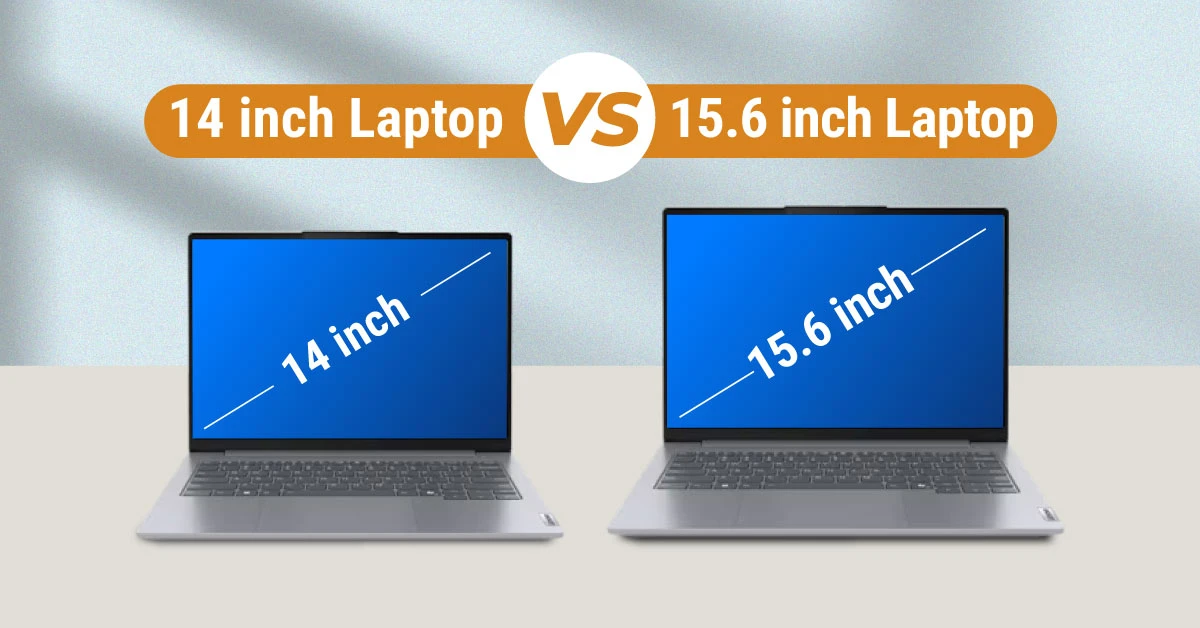
Choosing between a 14-inch vs. 15.6-inch laptop can be confusing because both sizes are useful for different types of users.
A 14-inch laptop is best for students, office users, travelers, and business users who need a compact device for daily tasks. You can easily carry its compact body, and its lighter weight reduces travel pressure.
It has good battery backup to support outdoor activities, has a full HD display to show everything clearly, and USB-C or HDMI ports help connect monitors and accessories when needed.
A 15.6-inch laptop is best for people who spend long hours on screen, work with Excel, type, do accounting, design, watch movies, or play casual gaming.
It has a larger display to show you everything, a wider keyboard to improve typing speed, a number pad to help with numeric typing, better cooling to support longer use, and a larger chassis to give more port options.
For the latest laptop size, price, brand, and configuration, check Ryans and choose the model that matches your daily use.
Quick Comparison Table: 14-Inch vs 15.6-Inch Laptop
Feature
14-Inch Laptop
15.6-Inch Laptop
Portability
Easier to carry every day
Less portable because of bigger size
Screen comfort
Good for normal work and study
Better for long viewing and multitasking
Weight
Usually lighter
Usually heavier
Keyboard layout
Compact keyboard layout
Wider keyboard layout
Number pad availability
Usually not available
Often available in many models
Desk space
Needs less desk space
Needs more desk space
Travel use
Better for travel, class, and meetings
Manageable, but less comfortable for daily travel
Long working hours
Good with external monitor
Better with built-in large screen
Entertainment
Good for casual watching
Better for movies and video content
Excel and accounting
Good for light work
Better for numeric work and large sheets
Data entry
Not ideal for heavy numeric input
Better because many models include a number pad
Battery backup
Often better due to smaller screen
Can use more battery because of larger display
Typing comfort
Good for short and medium typing
Better for long typing sessions
External monitor use
Very suitable
Useful, but less necessary
Best for
Students, travelers, business users
Office users, Excel users, home users
Setup style
Clean, compact, lightweight
Larger, more desk-focused setup
Overall choice
Best when portability matters
Best when screen space matters
14-Inch vs. 15.6-Inch Laptop by User Type
For Students
You should choose a 14-inch laptop if you attend classes, carry your laptop daily, and take notes often.
Its lightweight body helps you with travel, good battery backup supports long class hours, SSD storage opens files properly, and a clear, full HD display is enough for study, browsing, and online learning.
A 15.6-inch laptop is better if you study at home and want a larger screen.
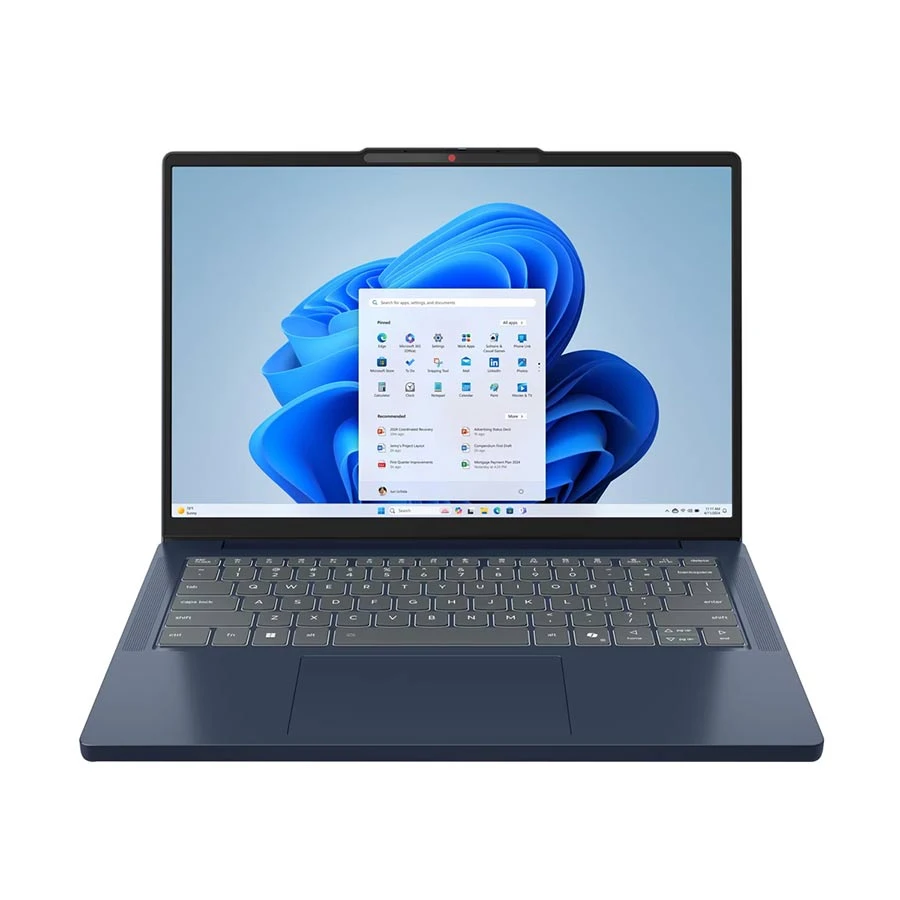
Lenovo IdeaPad Slim 3 AMD Ryzen 5 7535HS Laptop
Processor: AMD Ryzen 5 7535HS
RAM: 8GB DDR5
Storage: 512GB SSD
Display: 14 Inch FHD+ WUXGA
+ WHY IT'S ONE OF THE BEST
A strong 14-inch laptop for students, office users, freelancers, and daily travelers, the Lenovo IdeaPad Slim 3 14ARP10 offers an AMD Ryzen 5 7535HS processor, 8GB DDR5 RAM, 512GB SSD, and a sharp FHD+ WUXGA display. It is a good choice for class work, assignments, browsing, online meetings, multitasking, and portable daily use. সহজ কথায়, lightweight 14-inch laptop চাইলে এবং performance-ও ভালো দরকার হলে এটা strong option.
Note: Product prices may change at any time depending on stock, availability, and market conditions.
For Freelancers
Choose based on your work type. A 14-inch laptop is better if you work from cafés, client offices, or different places, because portability, battery backup, Wi-Fi support, and USB-C connectivity provide flexibility.
A 15.6-inch laptop is better if you work with design, content, Excel, or long writing because a larger display, a better keyboard, more ports, and strong cooling improve comfort.
Acer TravelLite i5 13th Gen Intel Core i5 Laptop
Processor: 13th Gen Intel Core i5-1335U
RAM: 8GB
Storage: 512GB SSD
Display: 14 Inch FHD
+ WHY IT'S ONE OF THE BEST
A portable 14-inch laptop for students, office users, business users, and daily travelers, the Acer TravelLite TL14-52M-i5 offers a 13th Gen Intel Core i5 processor, 8GB RAM, 512GB SSD, and FHD display. It is a good fit for classes, meetings, documentation, browsing, online work, and everyday multitasking. সহজ কথায়, lightweight 14-inch laptop চাইলে এবং trusted Acer business-style option দরকার হলে এটা strong choice.
Note: Product prices may change at any time depending on stock, availability, and market conditions.
For Gamers
A gamer should prefer a 15.6-inch laptop for gaming because a larger display makes games more enjoyable, dedicated graphics handle gaming visuals better, cooling supports long gaming sessions, and a wider keyboard gives more comfort.
A 14-inch laptop is fine for light games, but it may heat faster and feel small for long gaming.
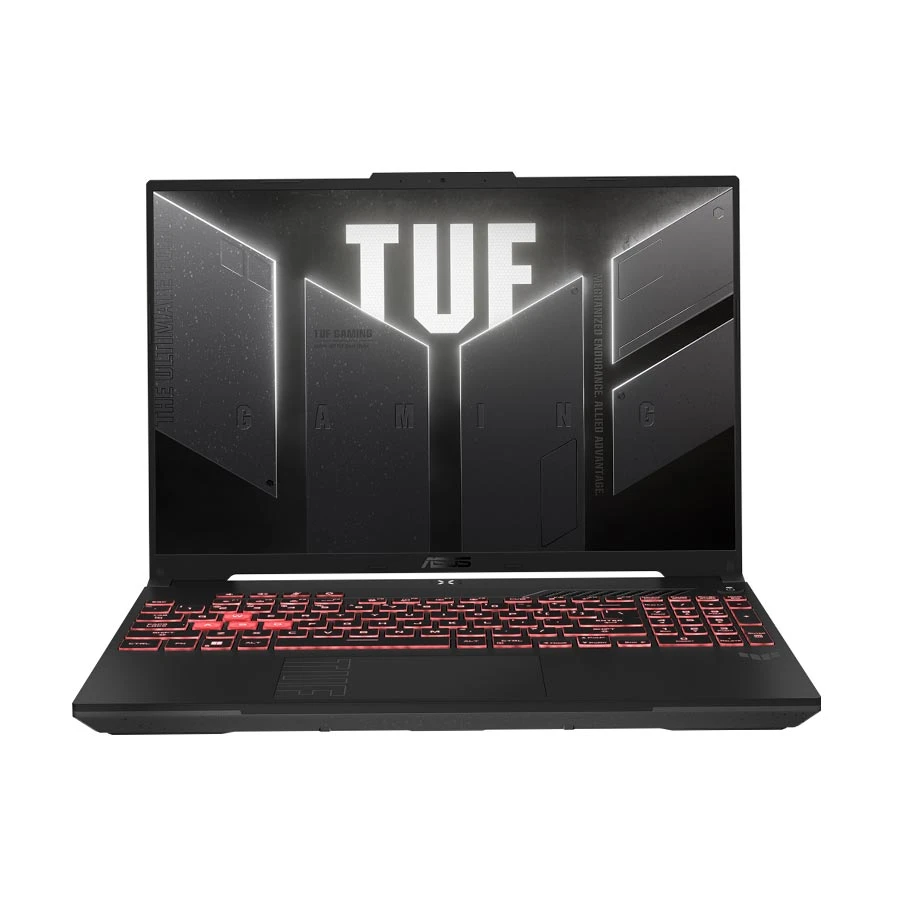
ASUS TUF Gaming AMD Ryzen 7 170 Gaming Laptop
Processor: AMD Ryzen 7 170
RAM: 16GB DDR5
Storage: 512GB SSD
Graphics: NVIDIA RTX 4050 6GB
Display: 16 Inch FHD+ WUXGA 144Hz
+ WHY IT'S ONE OF THE BEST
A powerful gaming laptop for gamers, creators, and heavy multitaskers, the ASUS TUF Gaming A16 FA607NUQ offers an AMD Ryzen 7 170 processor, 16GB DDR5 RAM, 512GB SSD, and NVIDIA RTX 4050 6GB graphics. The 16-inch FHD+ WUXGA 144Hz display makes it a strong choice for gaming, editing, streaming, multitasking, and performance-heavy work. সহজ কথায়, gaming, graphics work আর future-ready performance চাইলে এটা strong ASUS TUF option.
Note: Product prices may change at any time depending on stock, availability, and market conditions.
For Travelers and Business Users
Choose a 14-inch laptop if you travel frequently, because its compact size fits bags easily, lightweight design reduces carrying stress, long battery backup helps during travel, and a webcam with a microphone supports online calls.
A 15.6-inch laptop makes sense only if you travel less and need a larger screen.
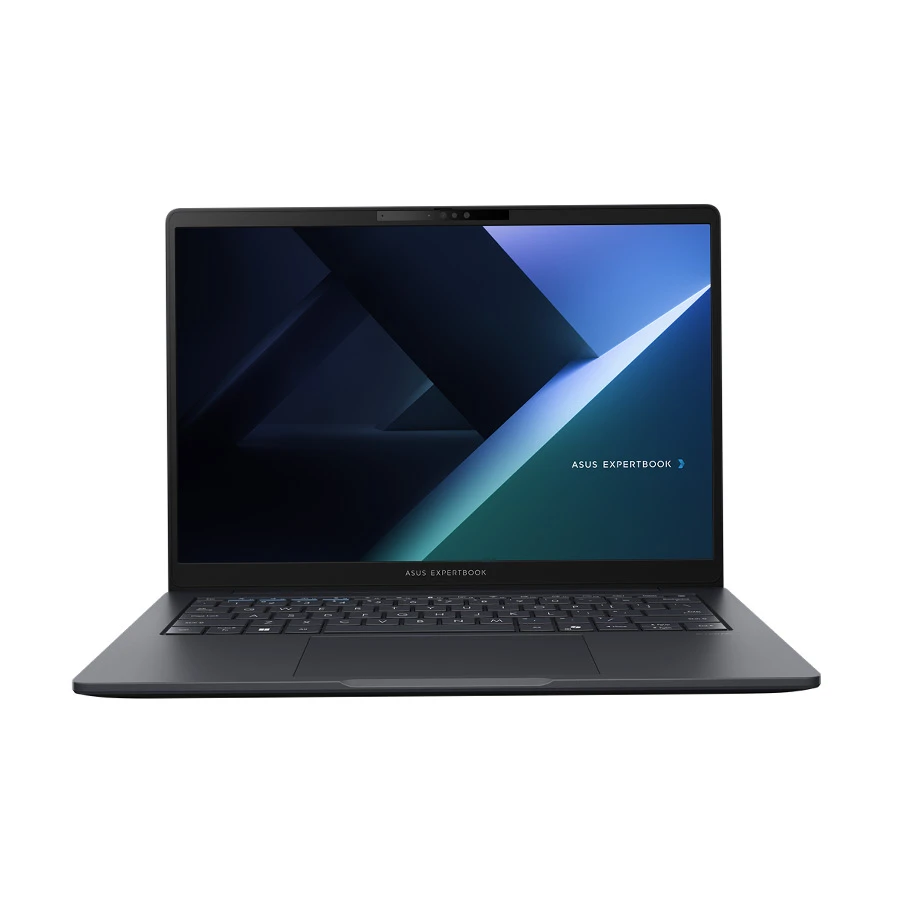
ASUS ExpertBook B3 B3405CCA Intel Core Ultra 5 Laptop
Processor: Intel Core Ultra 5 125H
RAM: 8GB DDR5
Storage: 512GB SSD
Graphics: Intel Arc Graphics
Display: 14 Inch FHD+ WUXGA
+ WHY IT'S ONE OF THE BEST
A professional 14-inch laptop for business users, students, freelancers, and office work, the ASUS ExpertBook B3 B3405CCA offers an Intel Core Ultra 5 125H processor, 8GB DDR5 RAM, 512GB SSD, Intel Arc Graphics, and a sharp FHD+ WUXGA display. It is a good choice for meetings, documentation, multitasking, online work, presentations, and daily productivity. সহজ কথায়, portable business-style laptop চাইলে এবং modern Intel Core Ultra performance দরকার হলে এটা strong ASUS ExpertBook option.
Note: Product prices may change at any time depending on stock, availability, and market conditions.
Main Difference Between 14 Inch and 15.6 Inch Laptops
Portability and Daily Carrying
You should choose a 14-inch-sized laptop if you want to carry it regularly, because its compact body, light weight, smaller charger, and portable design make classes, meetings, office travel, and outdoor work easier.
Screen Size and Work Comfort
You should choose a 15.6-inch display laptop if you want to work for long hours because its larger screen, wider viewing area, comfortable keyboard, and better multitasking ability help with Excel, writing, browsing, movies, and office work.
Keyboard and Number Pad
A 15.6-inch keyboard gives wider typing space and includes a number pad.
A 14-inch keyboard saves space from the desk but may feel tight for numeric work.
Desk Space and Setup Style
A 14-inch laptop fits into any desk and keeps your setup organized.
A 15.6-inch laptop needs more space but is better for long-term work.
When a 14-Inch Laptop Makes More Sense
A 14-inch laptop makes more sense when it can be carried everywhere; from a class conference to a Zoom meeting, you can use it for multiple purposes.
When You Carry Your Laptop Almost Every Day
Daily Travel
Choose a 14-inch laptop so you can carry it all the time, because its portability and easy fit make it better for all users.
Classes and Meetings
You can do everything with this compact laptop, for its good battery backup, quick charging, Wi-Fi support, and webcam quality to attend classes, meetings, calls, and presentations.
Shoulder Bag
Slim design and low weight make it easy to carry in your shoulder bag.
You can easily carry a smaller charger and USB-C charger in your portable bag.
Public Transport
Its compact body fits on every public transport.
Strong hinge and durable body help during daily movement.
When You Work in Different Places
Flexible Work
Youwill have full flexibility with this compact laptop because its small size, long battery life, portable charger, and wireless connection give you the flexibility to work anywhere.
Easy Setup
A 14-inch screen is easy to open on any table, and its SSD storage,RAM, clear display, and responsive keyboard provide you with the opportunity to work remotely.
Hybrid Work
Webcam quality and microphone clarity support online meetings remotely.
Wi-Fi 6 and Bluetooth support keep devices connected all the time.
Works Well with External Monitor
HDMI port and USB-C display output help at office desks.
When You Prefer a Clean and Lightweight Setup
Minimal Setup
You can use a minimum of setup with a 14-inch laptop because its compact design, small charger, thin body, and wireless accessories keep your desk easy to manage.
Work Without Clutter
A compact laptop’sUSB-C charging port, Bluetooth mouse, and external display support help you work properly, giving enough space.
Pair with Accessories
USB-C hub and HDMI support connect the monitor, keyboard, and mouse.
Bluetooth support keeps your setup easier with fewer cables.
When Portability Matters More Than Screen Size
Portability
A 14-inch laptop is a good choice for a frequent traveler because its smaller screen, lighter weight, thin body, and good battery life help you to carry it everywhere.
External Monitor
HDMI and USB-C display outputs are effective for small-screen limits.
A portable body gives travel comfort, while a monitor gives desk comfort.
When a 15.6-Inch Laptop Makes More Sense
Long Work Sessions
You can choose a 15.6-inch laptop if you want to work for long hours, because its larger display, wider keyboard, better viewing angle, and comfortable layout help reduce screen switching and make office tasks easier.
Office and Home Use
A 15.6-inch screen works better when you use the laptop in one place, because its number pad, bigger body, ports, and cooling space support Excel, data entry, browsing, and entertainment.
Multitasking
You get more space for side-by-side windows with a larger display and its full HD resolution, higher RAM, SSD storage, and processor to help work with documents, tabs, sheets, and apps.
Numeric Work
Number pad and wide keyboard help with Excel, accounts, and data entry.
Large screen and full HD display show more rows and columns.
Entertainment
Bigger display and speakers improve watching movies and good decibel audio.
Dedicated graphics and cooling for casual gaming and editing.
When You Spend Long Hours on the Screen
Comfortable Viewing
If you choose a 15.6-inch laptop, you can spend long hours on screen because its larger display, full HD panel, wider viewing angle, and comfortable brightness will not strain the eyes.
Reading and Writing
Large display and HD resolution make documents easier to read.
A wide keyboard and comfortable touchpad can keep you typing for long sessions.
Desk-Based Work
A stable body and a larger palm work better on a desk.
More ports and cooling support for long office hours.
When You Need More Space for Typing
Keyboard Comfort
The comfort of typing does matter, because its wider keyboard, larger palm rest, bigger touchpad, and more key spacing help you type reports, emails, assignments, and office documents more comfortably.
Long Documents
A 15.6-inch laptop keyboard provides longer typing sessions; its backlit keys, strong hinge, comfortable keys, and large screen help you work at night, review text, and write with fewer mistakes.
Number Input
Number pad and wide layout help with accounting and data entry.
Large touchpad and shortcut keys make work faster.
Office Typing
Comfortable palm rest and stable base reduce hand discomfort.
When You Work with Excel, Accounting, or Data Entry
Spreadsheets
A 15.6-inch laptop is effective for using Excel because its larger screen, number pad, wide keyboard, and full HD resolution help you view more rows and columns and enter numbers faster.
Accounting Work
A 15.6-inch display gives space for invoices, reports, and ledgers; its SSD storage, 8GB or 16GB RAM, a strong processor, and stable keyboard help run accounting software and office tools.
Numeric Tasks
Number pad and large keys make data entry faster and easier.
A wide screen and clear display show more spreadsheet details.
Office Software
Core i5/Ryzen 5 and SSD storage support office apps.
More ports and HDMI help connect the printer, monitor, and scanner.
When You Mostly Use the Laptop at Home or Office
Fixed Desk Use
You should choose a 15.6-inch laptop if you work from home or the office, because its large screen, wide keyboard, better ports, and stable design make long daily use possible.
Work and Entertainment
A larger-screen laptop works well as a main device; its full HD display,speakers, larger storage, and cooling support office tasks, online meetings, movies, editing, and casual gaming.
Shared Use
A large display and wide viewing angle are better for family use.
More ports and a stable body connect office accessories.
Long-Term Setup
External monitor support and HDMI to build a desk setup.
Bigger chassis and cooling space support longer working hours.
When a Bigger Display Matters More Than Portability
Screen-Focused Work
A larger-screen-size laptop matters more than carrying comfort because its larger display, multitasking space, comfortable viewing distance, and wide keyboard help you with work, study, and entertainment.
Visual Tasks
A bigger display is useful for design, video watching, reports, and spreadsheets. Its full HD resolution, IPS panel, dedicated graphics, and good brightness improve viewing quality and make it easier to see.
Casual Gaming
Dedicated graphics and cooling help casual gaming performance.
Large display and speakers make games more enjoyable.
Content Editing
Full HD display and wide screen help timeline-based editing.
High RAM and SSD storage make editing tools run better.
What Should You Check Before Choosing Laptop Size?
Weight and Portability
You should check weight and portability because daily carrying becomes tiring with heavy laptops, and a compact size is easier for class, the office, meetings, and travel.
Display Quality
You should check display resolution and panel quality because screen size alone is not enough; a full HD or IPS display gives clearer text and better viewing angles.
Battery Backup
You should check battery backup and charging type because smaller laptops may last longer, while larger displays can use more power during work or entertainment.
Keyboard and Number Pad
You should check keyboard comfort and number pad availability because typing, Excel, accounting, and data entry feel easier when the layout matches your daily work.
Processor
You should check processor generation and performance level because laptop size does not make speed; your CPU handles apps, browsing, office work, and multitasking.
RAM
You should check RAM size and upgrade options because 8GB is fine for normal use, and 16GB is better for heavy browsing, editing, and multitasking.
SSD Storage
You should check SSD capacity and storage speed because SSDs make booting, file opening, software loading, and daily work much faster than older hard drives.
Graphics Card
You should check integrated or dedicated graphics because normal users can use integrated graphics, but gaming, editing, and design need stronger graphics support.
Ports and Connectivity
You should check USB-C, HDMI, USB-A, and Wi-Fi because ports make it easier to connect monitors, projectors, keyboards, mouse, printers, and other devices.
Warranty and After-Sales Support
You should check the official warranty and service support because laptop repair costs can be high, and trusted after-sales service gives better long-term safety.
14-Inch or 15.6-Inch Laptop: Final Recommendation
Choose based on how often you carry the laptop, because a 14-inch model is easier for travel, and a 15.6-inch model is better for fixed desk use.
Check your work type, because Excel, accounting, typing, movies, and editing feel better on a 15.6-inch, while classes, meetings, and travel suit a 14-inch better.
You should think about external monitor use, because a 14-inch laptop with a monitor can give both portability and desk comfort, and a 15.6-inch gives built-in screen space.
Buy a 14-Inch Laptop If
Buy a 14-inch laptop if you carry a laptop regularly, attend classes or meetings, travel often, prefer a compact setup, or use an external monitor at home or in the office.
It is best when you want lightweight, wide desk space, good battery life, and easy movement.
Buy a 15.6-Inch Laptop If
Buy a 15.6-inch laptop if you want a larger screen, work long hours, need a number pad, use Excel, accounting, or data entry tools, or enjoy movies, editing, and casual games. It is better when screen comfort matters more than carrying.
FAQs
Should I buy a 14-inch laptop and use an external monitor?
Yes, buy a 14-inch laptop with an external monitor if you need portability outside and larger-screen comfort at home or in the office.
Which is better for students, a 14-inch or 15.6-inch laptop?
A 14-inch laptop is better for students who carry it daily; a 15.6-inch laptop is better for home study and bigger-screen comfort.
Do all 15.6-inch laptops have a number pad?
No, not all models have a number pad. You should check the keyboard layout before buying, especially for Excel or accounting work.
Is a 15.6-inch laptop too big to carry every day?
It can feel big if you travel daily. Choose a 14-inch for easy carrying or a 15.6-inch if screen comfort matters more.
Can I program comfortably on a 14-inch laptop?
Yes, you can code on a 14-inch laptop, especially with good RAM and an SSD. Use an external monitor for longer coding sessions.





Leave a comment