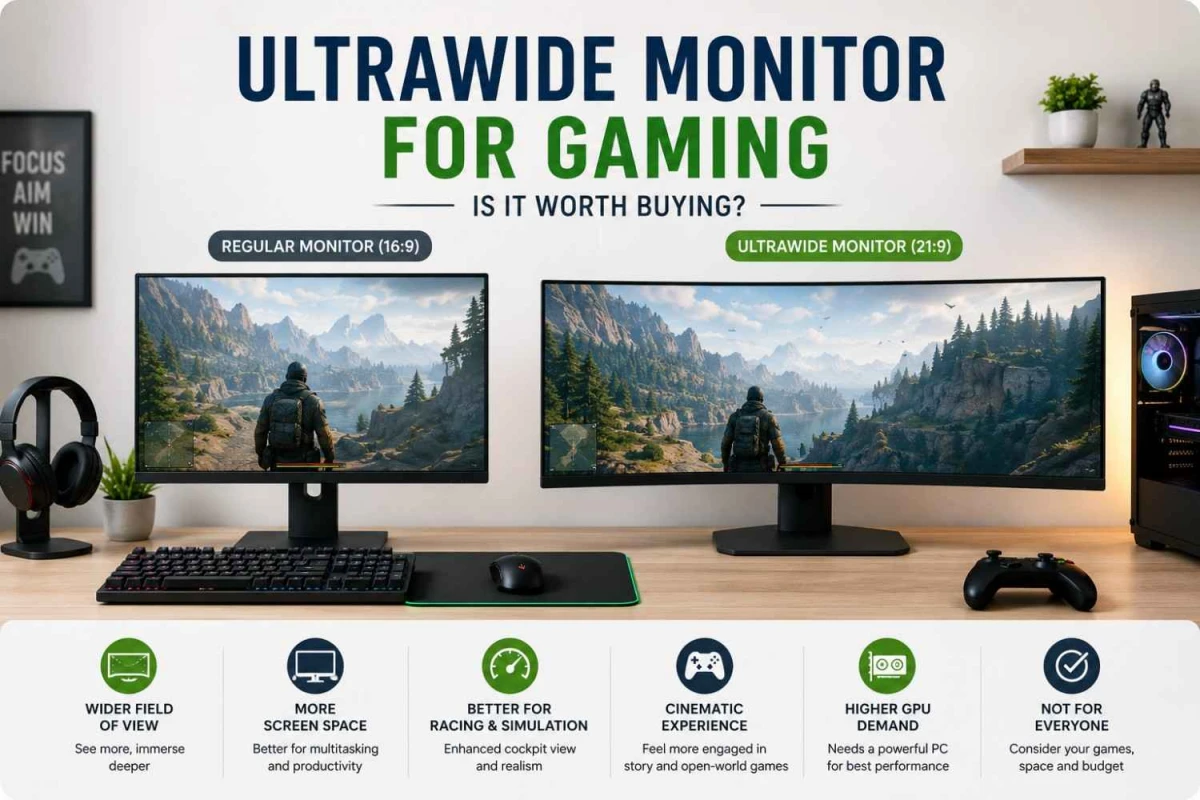
An ultrawide monitor can make games feel more cinematic, especially when you play racing, simulation, story, RPG, or open-world titles. But it is not the right choice for every gamer. Before buying one in Bangladesh, you should check game support, PC performance, screen size, refresh rate, ports, and your actual gaming style.
What Is an Ultrawide Monitor?
An ultrawide monitor is wider than a regular monitor. Most regular monitors use a 16:9 aspect ratio, while many ultrawide monitors use 21:9. Larger models may use 32:9, which is often called super ultrawide.
This wider shape gives you more horizontal screen space. In supported games, it can show more of the environment and create a more engaging viewing experience.
| Monitor Type | Common Aspect Ratio | Common Resolution | Best Use |
|---|---|---|---|
| Regular Monitor | 16:9 | 1920 x 1080 / 2560 x 1440 | Office work, study, general gaming, console gaming |
| Ultrawide Monitor | 21:9 | 2560 x 1080 / 3440 x 1440 | Immersive PC gaming, multitasking, editing, racing games |
| Super Ultrawide Monitor | 32:9 | 5120 x 1440 | Simulation, trading, productivity, advanced gaming setups |
For most gaming setups, a 34 inch 3440 x 1440 ultrawide monitor is a practical choice because it gives more screen width without becoming too extreme.
Why Gamers Choose Ultrawide Monitors
The biggest reason is the wider field of view. In supported games, an ultrawide screen can show more of the left and right side of the scene. This makes the game world feel larger and more natural.
It works especially well when the game focuses on scenery, movement, exploration, or cockpit-style views.
Racing Games
The wider screen can make the road, cockpit, and side view feel more realistic.
Open-World Games
Landscapes, cities, roads, and environments feel broader and more engaging.
Simulation Games
Flight, driving, and truck simulators benefit from extra side visibility.
Story Games
Cinematic scenes and wide environments can look more dramatic.
Ultrawide Monitor vs Regular Gaming Monitor
A regular gaming monitor is easier to run, easier to fit on most desks, and better supported by almost every game. An ultrawide display gives a larger visual area, but it needs stronger hardware and proper game support.
| Feature | Regular Gaming Monitor | Ultrawide Gaming Monitor |
|---|---|---|
| Screen Shape | Standard 16:9 | Wider 21:9 or 32:9 |
| Game Support | Very strong | Good, but not universal |
| Immersion | Good | Stronger in supported games |
| GPU Demand | Lower | Higher because of extra pixels |
| Desk Space | Easier to manage | Needs more width |
| Console Use | Better match | Often limited to 16:9 output |
| Best For | Competitive gaming, general use, consoles | PC gaming, racing, simulation, productivity |
Is Ultrawide Good for Competitive Gaming?
Ultrawide gaming is enjoyable, but it is not always the best option for competitive players.
In esports titles, the most important things are usually high refresh rate, low input lag, fast response time, stable FPS, and clear motion. A 24 inch or 27 inch gaming monitor can be easier to focus on because your eyes can scan the full screen faster.
Some competitive games support ultrawide properly, while others may limit the field of view to keep gameplay fair. That is why ultrawide is better for immersion than pure esports performance.
If you mainly play Valorant, CS2, Fortnite, Apex Legends, or PUBG for ranked performance, a regular high refresh rate monitor may be more practical.
Best Games for Ultrawide Monitors
Ultrawide screens work best when the game benefits from a wider scene and more visual space.
- Racing Games: Better cockpit feel and wider road visibility.
- Open-World Games: More enjoyable landscapes, cities, maps, and environments.
- Simulation Games: Stronger experience for flight, truck, driving, and space simulators.
- RPG Games: Wider world view makes exploration feel more engaging.
- Strategy Games: Extra space helps with maps, menus, and unit control.
- Story-Based Games: Cinematic scenes can feel more natural on a 21:9 screen.
When Ultrawide May Not Be Worth It
An ultrawide monitor is not always the best investment. It depends on your gaming device, room setup, and the type of games you play.
- Your desk does not have enough space.
- Your graphics card is not powerful enough for higher resolution gaming.
- You mainly play esports titles.
- You use PlayStation or Xbox more than PC.
- Your budget is limited.
- You want the highest FPS possible at the lowest cost.
- Your favorite games do not support 21:9 or 32:9 properly.
Some games may show black bars on the sides. Some may stretch the image. Others may support ultrawide during gameplay but not in menus or cutscenes.
Ultrawide Monitor and PC Performance
Wider resolution means your graphics card has to work harder. A 3440 x 1440 display has more pixels than a standard 2560 x 1440 monitor, so FPS can drop if your GPU is not strong enough.
| Resolution | Approx. Pixel Count | Performance Demand |
|---|---|---|
| 1920 x 1080 | About 2.1 million pixels | Lower |
| 2560 x 1440 | About 3.7 million pixels | Medium |
| 3440 x 1440 | About 5 million pixels | Higher |
| 5120 x 1440 | About 7.3 million pixels | Much higher |
Before buying, check your graphics card, processor, RAM, target game settings, and expected FPS. If your PC already struggles at 1440p, a 3440 x 1440 ultrawide monitor may reduce performance further.
Refresh Rate, Response Time, and Adaptive Sync
Screen width alone does not make a monitor good for gaming. Motion performance still matters.
Refresh Rate
100Hz is a good minimum for casual gaming. 144Hz or higher is better if you want smoother movement.
Response Time
Lower response time helps reduce blur and ghosting during fast scenes.
Adaptive Sync
AMD FreeSync, NVIDIA G-SYNC Compatible, and VRR can reduce tearing when FPS changes.
For PC gaming, DisplayPort is often the safer choice for high refresh rate ultrawide monitors. HDMI can also work, but the supported resolution and refresh rate depend on the monitor and port version.
Curved vs Flat Ultrawide Monitor
Many large ultrawide monitors are curved because the screen is physically wider. A curve brings the left and right edges slightly closer to your eyes, which can make the display feel more comfortable.
| Type | Best For | What to Know |
|---|---|---|
| Flat Ultrawide | Productivity, editing, mixed use | Better if you prefer straight lines and simple viewing |
| Curved Ultrawide | Gaming, movies, immersion | More comfortable on wider screens |
| Strong Curve | Racing, simulation, cockpit view | Feels more focused, but may not suit everyone |
For gaming, a curved monitor usually makes more sense at 34 inches or larger. For design or editing, check whether the curve affects your comfort before choosing.
Is Ultrawide Good for Console Gaming?
Ultrawide monitors are mainly better for PC gaming. Most PlayStation and Xbox games are designed for 16:9 output, so a 21:9 or 32:9 monitor may show black bars on the sides.
Console users should check:
- HDMI version
- 120Hz support
- 1440p or 4K support
- VRR support
- Whether the monitor handles console output properly
If your main device is a PlayStation or Xbox, a regular 16:9 gaming monitor is usually safer. If your main device is a gaming PC, ultrawide becomes more useful.
Ultrawide Monitor for Work and Gaming
One strong advantage of an ultrawide screen is that it can support both gaming and productivity. Many users choose it as an alternative to a dual-monitor setup.
It is helpful for:
- Freelancing
- Video editing
- Coding
- Trading
- Research
- Spreadsheet work
- Content writing
- Streaming setup
For example, you can keep a browser on one side and a document on the other. Video editors can also use the extra width for longer timeline views.
Best Ultrawide Monitor Specs to Check
Do not buy only because the screen is wide. The right specification matters more than size alone.
| Feature | Recommended Choice |
|---|---|
| Size | 34 inch is a practical starting point |
| Resolution | 3440 x 1440 for sharper gaming and workspace |
| Refresh Rate | 100Hz minimum, 144Hz or higher preferred |
| Panel Type | IPS for color, VA for contrast, OLED for premium use |
| Curve | Useful for large ultrawide gaming screens |
| Sync Support | FreeSync, G-SYNC Compatible, or VRR |
| Ports | HDMI and DisplayPort are important |
| Stand | Height and tilt adjustment improve comfort |
| Warranty | Check official warranty and after-sales service |
Ultrawide Monitor Price and Value in Bangladesh
In Bangladesh, ultrawide monitors usually cost more than regular monitors because they offer a larger panel, wider resolution, and more advanced features.
Price can change based on brand, screen size, resolution, refresh rate, panel type, curvature, USB-C support, HDR, and warranty.
A budget ultrawide monitor can be useful for casual gaming and productivity. A premium model is better if you want higher refresh rate, stronger color, better contrast, and smoother motion.
At Ryans, you can compare gaming monitors, regular monitors, and ultrawide options based on your budget, use case, and preferred brand. You can also explore monitor accessories if you need a monitor arm, cable, or workspace upgrade.
Pros and Cons of Ultrawide Monitor for Gaming
| Pros | Cons |
|---|---|
| More cinematic gaming experience | Costs more than regular monitors |
| Wider field of view in supported games | Needs stronger GPU performance |
| Great for racing, simulation, and story games | Not all games support ultrawide properly |
| Useful for multitasking and productivity | Takes more desk space |
| Can replace a dual-monitor setup for many users | Console support is limited |
| Works well for editing timelines and wide workspaces | May not be ideal for esports-focused players |
Who Should Buy an Ultrawide Gaming Monitor?
Good Choice If You
- Play racing, simulation, RPG, or open-world games
- Use a gaming PC with a strong graphics card
- Need one screen for gaming and productivity
- Prefer a wider workspace over two separate monitors
- Have enough desk space
May Not Suit You If You
- Mainly play competitive esports
- Use a low-end graphics card
- Play mostly on console
- Have limited desk space
- Need the cheapest gaming display
Conclusion
Yes, an ultrawide monitor is worth buying if you want a more cinematic gaming experience and your PC can handle the extra resolution.
It is especially good for racing, simulation, open-world, story-based, RPG, and productivity-focused setups. It also makes sense if you want one large display for both gaming and multitasking.
It is less practical if you mainly play competitive esports, use a console, have limited desk space, or want the highest FPS at the lowest budget.
For many PC gamers in Bangladesh, a 34 inch 3440 x 1440 ultrawide gaming monitor with 100Hz or 144Hz refresh rate is a balanced choice. Before buying from Ryans, compare the size, resolution, refresh rate, panel type, curve, ports, Adaptive Sync support, and warranty.





Leave a comment