Choosing the right laptop in Bangladesh has become more confusing than ever due to the huge number of models, specifications, and price variations. For many users, especially students, freelancers, office users, gamers, and professionals, an Acer laptop is often one of the most reliable and value-for-money options.
However, the real challenge is not choosing Acer as a brand, but selecting the right Acer laptop based on performance, portability, and budget. This Acer Laptop Buying Guide in Bangladesh 2026 is designed to help buyers understand every important factor. So they can confidently choose the best Acer laptop without wasting money or getting confused by technical terms like laptop processor, RAM, SSD storage, GPU, and display panel.
Why Buy an Acer Laptop in Bangladesh?
Acer is one of the most popular laptop brands in Bangladesh because it offers a strong balance between performance, affordability, and availability. If you are looking for an entry-level device for study or a high-performance gaming machine, Acer provides options across all segments.
Another reason Acer is widely preferred is its wide processor lineup, including Intel Core i3 / i5 / i7 and AMD Ryzen 3 / 5 / 7 laptops. These CPUs are available in different generations, allowing users to choose based on CPU performance, multitasking ability, and clock speed.
Acer also offers good build quality, decent battery life, and upgradeable models in many series, making it a practical choice for long-term use in Bangladesh.
What to Consider Before Buying an Acer Laptop
Before selecting any Acer laptop, it is important to understand the core hardware components that directly affect performance.
A laptop’s real power depends on the processor, RAM, SSD storage, graphics card (GPU), display panel, battery life, operating system, build quality, performance, and portability. Each of these plays a different role depending on whether you are using the laptop for study, gaming, or professional work.
Many buyers in Bangladesh make the mistake of focusing only on price. Instead, you should always focus on balancing specifications based on your daily usage needs.
Choose the Right Acer Laptop Type
Choosing the right Acer laptop type is the first step to making a smart purchase. Students, office users, gamers, and creative professionals all have different performance needs, so understanding which type fits your usage will help you get better value and avoid buying the wrong laptop.
Student Acer Laptops
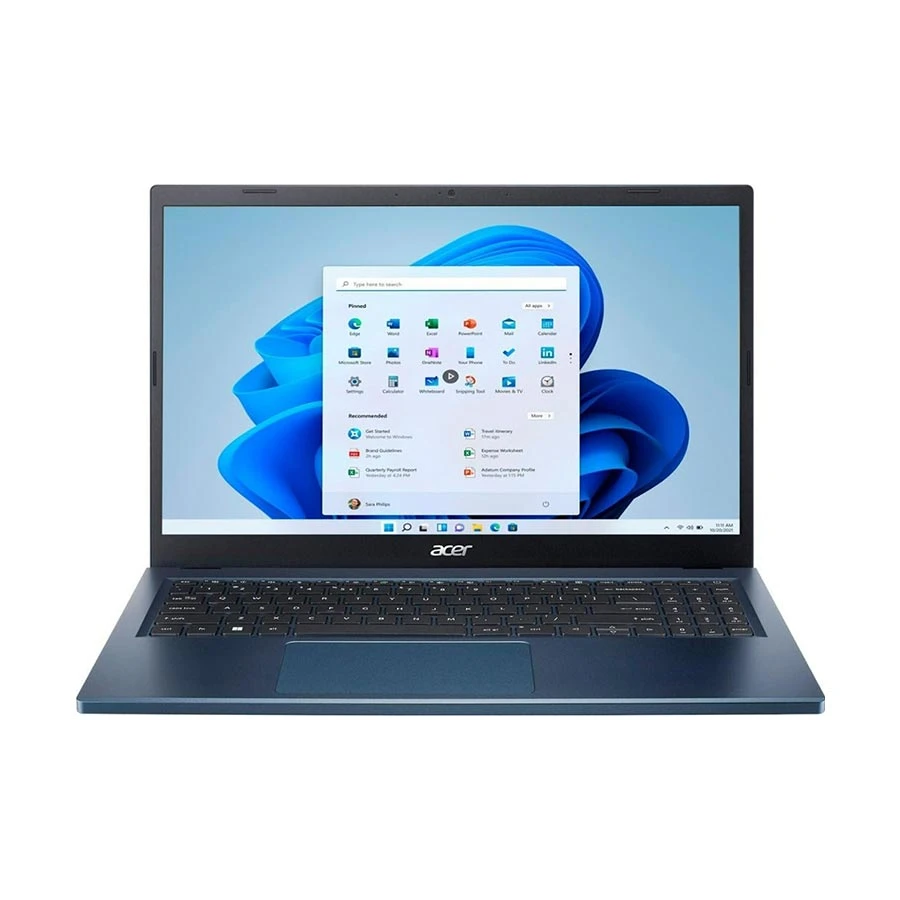
Acer Aspire 3 13th Gen Intel Core i3 1305U 8GB RAM, 512GB SSD Blue Laptop
Display: 15.6 inch, Resolution - 1920x1080
Processor: 13th Gen Intel Core i3 1305U
Graphics: Intel UHD Graphics
Warranty: 2 Year (1 year for battery and adapter)
+ WHY IT'S ONE OF THE BEST
A smart everyday laptop for students, home users, and office work. The Acer Aspire 3 A325-53 combines a 13th Gen Intel Core i3 processor, 8GB RAM, and 512GB SSD with a 15.6-inch Full HD display, giving you smooth daily performance, fast boot time, and practical value in a slim blue design.
For students, lightweight Acer laptops with Intel Core i3 or AMD Ryzen 3 processors and 8GB RAM are usually enough for daily academic tasks. These laptops are designed to handle online classes, web browsing, assignments, PDF reading, presentations, and Microsoft Office applications smoothly without lag.
A 14 inch or 15.6 inch laptop are considered the best choice for students because it offers a perfect balance between portability and screen comfort. It is easy to carry in a backpack. They are ideal for college, university, and tuition classes. Many Acer student laptops also come with SSD storage, which significantly improves boot time and application loading speed compared to traditional HDD systems.
For students who multitask heavily or use multiple browser tabs, upgrading to 16GB RAM can also improve long-term performance and smoother experience in modern web-based learning platforms.
Office Acer Laptops
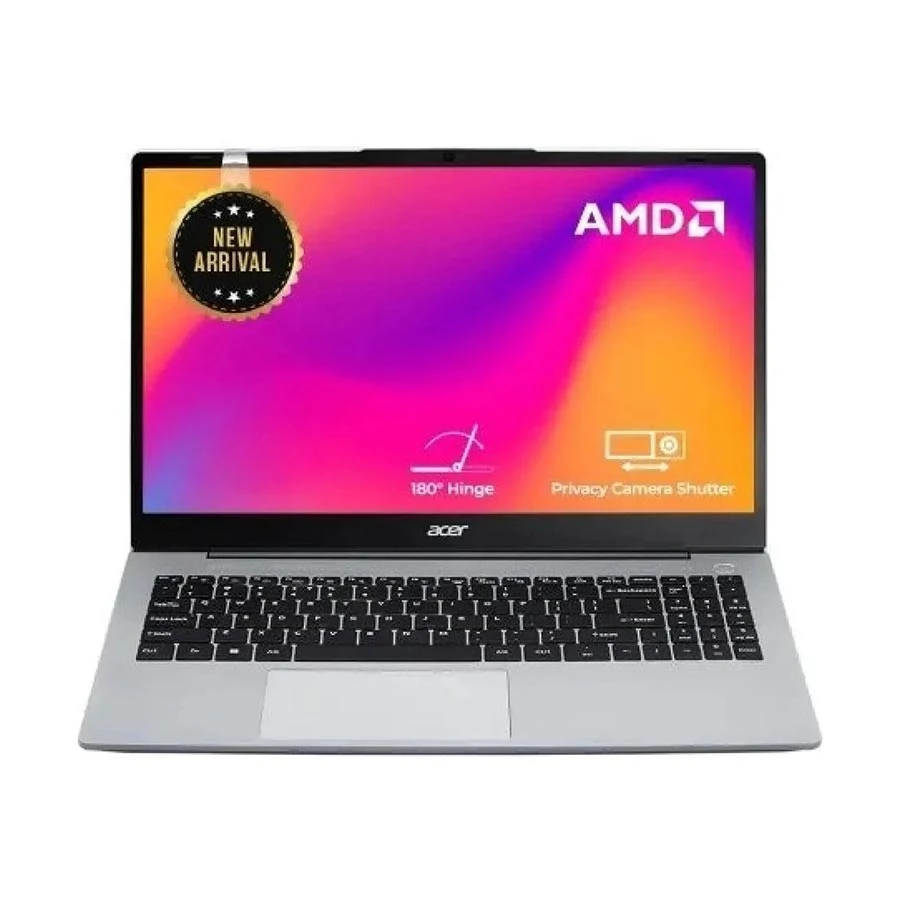
Acer Aspire 15 AMD Ryzen 3 7330U 8GB RAM 512GB SSD 15.6 Inch Laptop
Display: 15.6 inch IPS, Resolution - 1920x1080
Processor: AMD Ryzen 3 7330U
Graphics: AMD Radeon Graphics
Warranty: 2 Year (1 Year Traveles) (1 year for Battery and Adapter)
+ WHY IT'S ONE OF THE BEST
A practical everyday laptop for study, office tasks, browsing, and regular home use. This Aspire 15 gives you a Ryzen 3 processor, 8GB RAM, fast 512GB SSD storage, and a 15.6-inch Full HD IPS display in a clean Pure Silver design.
Office users require more stability, speed, and multitasking capability. An Intel Core i5 or AMD Ryzen 5 Acer laptop with SSD storage is the most balanced option for professional work environments.
These laptops are ideal for Excel spreadsheets, PowerPoint presentations, email communication, Zoom/Google Meet meetings, accounting software, and business management tools. SSD storage ensures fast system responsiveness. They allow users to switch between multiple applications without delay.
For professionals who work long hours, Acer office laptops often come with better battery optimization and comfortable keyboards. A 15.6 inch laptop is also a good option for office users who prefer a larger display for multitasking and document handling.
Gaming Acer Laptops
Acer Predator Helios Neo Intel Core Ultra 7 255HX 16GB RAM Black Gaming Laptop
Display: 16 inch OLED, Resolution - 2560x1600
Processor: Intel Core Ultra 7 255HX
Graphics: Nvidia RTX 5060 Graphics, 8GB
Warranty: 2 Year (1 Year Traveles) (1 year for Battery and Adapter)
+ WHY IT'S ONE OF THE BEST
A premium gaming laptop built for high-end performance, creative work, and AI-optimized workloads. This Predator Helios Neo 16S AI combines a Core Ultra 7 255HX processor, RTX 5060 8GB graphics, 16GB DDR5 RAM, 1TB SSD, and a sharp 16-inch 2.5K OLED display for fast, smooth, and immersive use.
Acer gaming laptops, especially the Acer Nitro and Predator series, are built for high-performance gaming and demanding workloads. These laptops come with a dedicated graphics card (GPU). They deliver smooth frame rates in modern AAA games and supports advanced rendering tasks.
Gaming laptops are not only for entertainment, they are also powerful enough for live streaming, content creation, 3D modeling, and heavy multitasking. To ensure optimal performance, 16GB RAM and NVMe SSD storage are strongly recommended for gamers in 2026.
In addition, gaming Acer laptops feature advanced cooling systems to maintain performance during long gaming sessions. High refresh rate displays (120Hz/144Hz or more) also enhance smooth gameplay and reduce motion blur. They provide a competitive advantage in fast-paced games.
Creative Work Acer Laptops
For creative professionals such as video editors, graphic designers, animators, and 3D artists, Acer offers powerful laptops equipped with Intel Core i7 or AMD Ryzen 7 processors, dedicated GPU, and high-speed SSD storage.
These laptops are designed to handle demanding software like Adobe Premiere Pro, Photoshop, After Effects, Blender, and AutoCAD efficiently. A dedicated GPU helps accelerate rendering speed, while SSD storage ensures faster file access and smoother project handling.
For creative workloads, 16GB RAM is the minimum recommended, while 32GB RAM is ideal for professional-level editing and animation work. High color accuracy displays also play an important role in ensuring precise design output and better visual quality.
Pick the Right Processor for Your Workload
The processor is the most important factor in laptop performance. Intel Core i3 and Ryzen 3 processors are suitable for basic tasks like browsing, study, and office work. Intel Core i5 and Ryzen 5 are ideal for multitasking and moderate workloads. Intel Core i7 and Ryzen 7 processors are designed for heavy tasks like gaming, editing, and programming.
Always prefer the latest generation CPU because newer chips offer better CPU performance, energy efficiency, and speed optimization.
Choose the Right RAM and Storage
- RAM and storage determine how fast and smooth your laptop performs during multitasking.
- 8GB RAM is still acceptable for basic users, but in 2026, 16GB RAM is becoming the standard for smooth performance in gaming, editing, and professional work.
- When it comes to storage, always choose SSD over HDD. An NVMe SSD is even faster and significantly improves boot time, file transfer speed, and application loading.
- A balanced combination of 8GB RAM + SSD is good for students, while 16GB RAM + NVMe SSD is ideal for professionals and gamers.
Integrated vs Dedicated Graphics: Which One Do You Need
Integrated graphics are built directly into the processor (CPU) and share system memory (RAM) to handle visual output. These are suitable for everyday computing tasks such as office work, web browsing, online classes, video streaming, and light photo editing. Integrated graphics are also more power-efficient, which helps improve battery life and portability.
Modern integrated graphics from Intel and AMD have improved significantly, allowing smooth playback of Full HD videos, screen casting, and basic multitasking without any major performance issues.
Dedicated graphics (GPU) come with their own separate memory (VRAM) and processing power. This makes them essential for gaming, video editing, 3D rendering, animation, and other creative workloads. If your goal is smooth gameplay in modern AAA titles, faster rendering in editing software, or handling complex visual tasks, a dedicated GPU is a must-have feature in an Acer laptop.
Display, Screen Size, and Build Quality
Display quality plays a major role in your overall laptop experience, and many users in Bangladesh often underestimate its importance when choosing an Acer laptop. A good display directly impacts productivity, eye comfort, gaming experience, and content consumption quality.
A 14 inch laptop is ideal for users who prioritize portability and mobility. It is lightweight, easy to carry, and perfect for students, freelancers, and professionals who frequently travel or attend classes. Despite the smaller size, modern Acer 14-inch laptops still offer sharp visuals and comfortable viewing for daily tasks.
A 15.6 inch laptop provides a more immersive viewing experience. The larger screen is highly suitable for gaming, video editing, multitasking, spreadsheets, and entertainment. It allows users to work with multiple windows side by side, improving productivity for office users and creators.
A Full HD (FHD) display offers sharper visuals compared to HD screens, while IPS panels provide better color accuracy, wider viewing angles, and improved brightness levels. These features are especially important for designers, gamers, and users who consume a lot of multimedia content.
Avoid These Mistakes Before Buying a Laptop in Bangladesh
Buying a laptop sounds easy until you realize how many people end up with the wrong one. A device may look great in photos, seem affordable, or have a big brand name, but that does not always mean it is the right fit for your work, study, or daily use. Before you spend your money, make sure you are not making these common mistakes.
Choosing an Acer Laptop Based Only on Price
One of the most common mistakes buyers make is selecting a laptop only because it is cheaper. Low-priced Acer laptops may look attractive initially, but they often come with compromises in performance, RAM capacity, storage type, display quality, or upgrade options. Over time, this can lead to slow performance and early upgrades, which actually increases overall cost. Instead, always focus on balanced specifications based on your real usage needs.
Buying a Gaming Laptop for Simple Office or Study Work
Many users in Bangladesh buy gaming laptops thinking they are “better for everything,” but this is not always practical. Acer gaming laptops are powerful and include dedicated GPUs, but they are also heavier, more expensive, and consume more battery. For basic tasks like study, browsing, or office work, a simpler Intel Core i3 / Ryzen 3 or Core i5 / Ryzen 5 laptop is more than enough and much more cost-efficient.
Overlooking Important Ports and Connectivity Options
Ports and connectivity play a major role in everyday usability. Before buying an Acer laptop, always check for USB ports, HDMI output, USB Type-C, and audio jack availability. These are essential for connecting external devices, projectors, monitors, and accessories.
Not Checking Keyboard, Webcam, and Audio Quality
These features are often ignored but are extremely important for daily usage. A comfortable keyboard improves typing speed and productivity. A good quality webcam is essential for online classes, Zoom meetings, and remote work.
Skipping RAM and SSD Upgrade Options for Long-Term Value
Many users do not consider future upgrade possibilities when buying a laptop. Choosing an Acer laptop with upgradeable RAM and SSD storage ensures long-term performance improvement without needing to replace the entire device. In 2026, having upgrade flexibility is one of the most important factors for better value and longevity.
Not Checking Warranty, Authenticity, and Official Support
Warranty and authenticity are critical when buying laptops in Bangladesh. Always ensure the Acer laptop comes with official warranty support to guarantee safety, genuine parts, and reliable service. Without proper warranty, repair costs and risks of counterfeit products can become a serious issue.
Not Comparing Acer Laptop Prices Across Trusted Shops
Laptop prices in Bangladesh can vary significantly between retailers. Not comparing prices may lead to overpaying for the same product. Always check multiple trusted shops to ensure you are getting the best Acer laptop price in BD along with genuine warranty support.
Overlooking After-Sales Service Availability
After-sales service is just as important as the laptop itself. Even a high-quality device may require maintenance or repair over time. Choosing a seller with strong after-sales support and service availability in Bangladesh ensures peace of mind and long-term usability.
Where to Buy an Original Acer Laptop in Bangladesh
Buying an Acer laptop is a long-term investment, so choosing a reliable store is just as important as choosing the right configuration. To ensure you get a 100% genuine Acer laptop with full manufacturer backing, it’s always best to buy from a trusted and authorized retailer. One of the most dependable names in Bangladesh is Ryans Computers, known for offering authentic products, verified specifications, and strong customer support.
- 100% Original Acer Laptops
- Official Warranty Support
- Wide Range of Models
- Competitive Pricing
- Expert Guidance
- Reliable After-Sales Service
- Trusted Brand Reputation
FAQs
Does upgrading RAM or SSD affect Acer laptop warranty?
In most cases, upgrading RAM or SSD does not void warranty, but it is always recommended to check official warranty terms before upgrading.
Is 8GB RAM enough for an Acer laptop in 2026?
Yes for basic tasks, but 16GB RAM is recommended for smoother multitasking and gaming.
How can I improve Acer laptop battery lifespan?
Avoid overcharging, reduce brightness, use power-saving mode, and close unnecessary background apps.
Is Acer Nitro worth buying for budget gaming?
Yes, Acer Nitro is one of the best budget gaming laptop series in Bangladesh with strong GPU performance.
Is an Acer laptop good for online classes and remote work?
Yes, Acer laptops are highly suitable for online learning, meetings, and remote work setups.
Are Acer laptops good for programming and video editing?
Yes, especially models with Intel Core i5/i7 or Ryzen 5/7 and SSD storage.





Leave a comment