Key takeaways
- Match resolution and refresh rate to what your GPU can actually render.
- IPS is the all-rounder, VA gives contrast, OLED gives speed and true blacks.
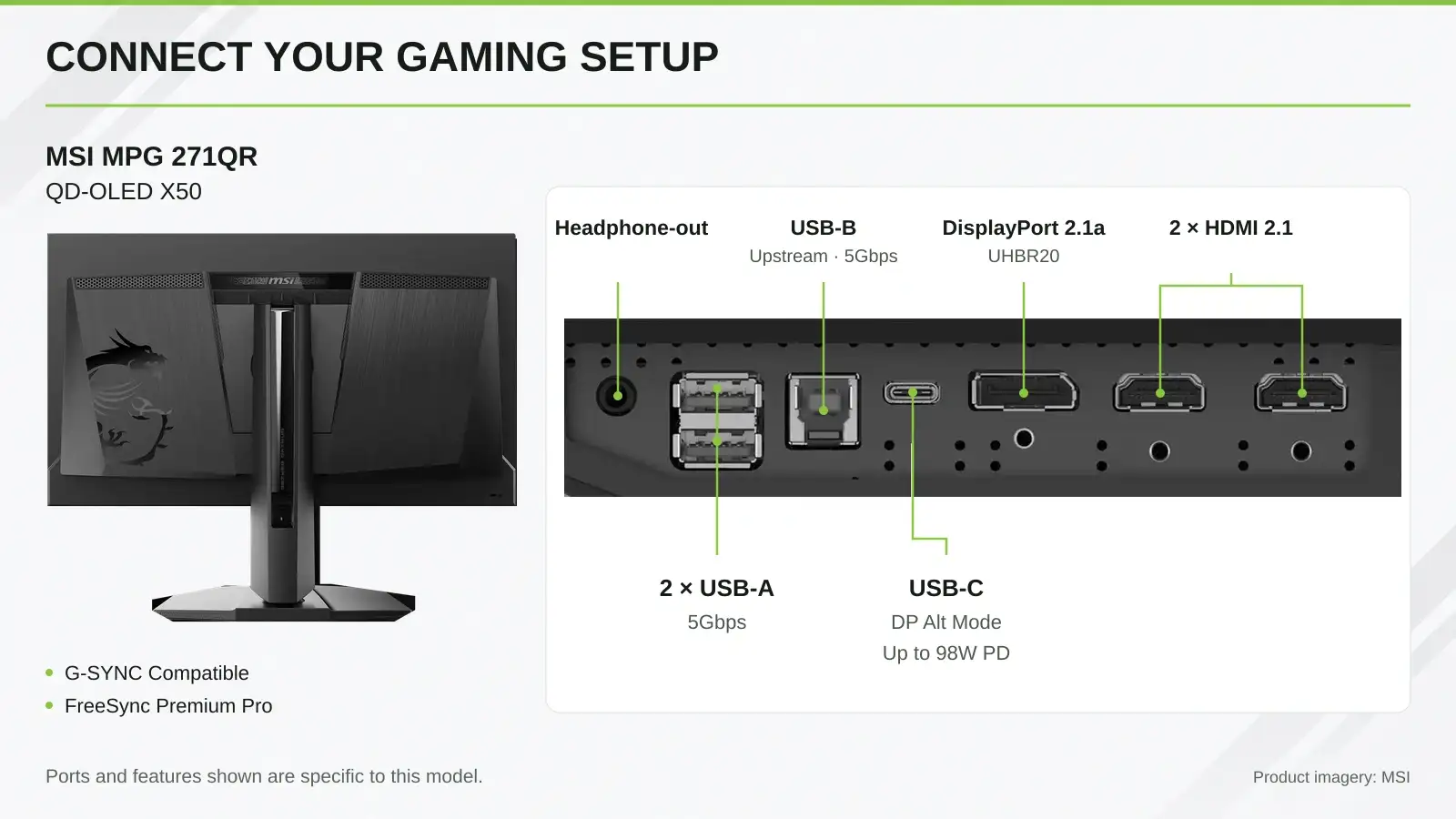
- Verify exact port modes, VRR range and independent response-time tests.
Which Gaming Monitor Should You Choose?
Choosing depends on your main genre, your PC or console, and your budget. Pick your gamer type to see the ideal specs.
Interactive monitor finder
Budget gamer
Specs
24-inch; Full HD; 100–144Hz; IPS or VA; Adaptive-Sync
Best for
Affordable 1080p gaming
Esports player
Specs
24–25-inch; Full HD; 240Hz+; low GtG; adjustable stand
Best for
Competitive FPS and esports
QHD gamer
Specs
27-inch; 2560 × 1440; 144–180Hz; Fast IPS
Best for
Sharper visuals with high refresh
Racing / immersive
Specs
32–34-inch+; UWQHD or higher; 21:9; 120Hz+; VA, IPS or OLED
Best for
Racing, sim and open-world
Console gamer
Specs
27–32-inch; FHD, QHD or 4K; verify 120Hz and VRR for your console
Best for
PS5 and Xbox Series X/S
Creator-gamer
Specs
27–32-inch; QHD or 4K; IPS or OLED; wide gamut; 120Hz+; USB-C
Best for
Creation and gaming on one display
Start with Your Games, Device and Target Frame Rate
Match the Monitor to Your Graphics Hardware
Choose resolution and refresh rate around your GPU’s real performance. These are workload examples, not guaranteed frame rates.
Performance depends on the game, settings, ray tracing, GPU power limit, cooling, CPU and frame generation. Check benchmarks for your games.
Why Refresh Rate and FPS Must Work Together
A 180Hz monitor fed 60 FPS still shows 60 updates per second.
Refresh rate (Hz) is how often the display updates. FPS is how many frames your GPU renders. Adaptive sync bridges small gaps to prevent tearing, but only a capable GPU unlocks a high-refresh display.
Frame rate simulator
Pick a monitor refresh rate and a GPU frame rate. You only see the lower of the two.
Choose the Right Screen Size and Resolution
Refresh Rate, Response Time and Input Lag
GtG measures pixel change between gray shades; MPRT measures how long a moving image stays visible. They are not interchangeable. A 1ms MPRT claim may need backlight strobing, which lowers brightness and may not work with VRR. Aggressive overdrive causes inverse ghosting.
Input lag is the display’s delay, but the full button-to-screen time also includes your device, game and PC or console. Check independent measurements at your intended refresh rate.
Panel Types: IPS vs VA vs TN vs OLED vs Mini LED
IPS
Strengths
Fast on modern models; strong color; wide viewing angles
Trade-off
Weaker black depth
Best for
All-round gaming, creative work
Contrast
VA
Strengths
Higher native contrast; strong dark scenes
Trade-off
Some dark smearing or ghosting
Best for
Immersive, single-player
Contrast
TN
Strengths
Very fast LCD response
Trade-off
Color shift; narrow viewing angles
Best for
Competitive esports
Contrast
OLED
Strengths
Extremely fast response; true blacks; excellent color
Trade-off
Burn-in with prolonged static content
Best for
Premium gaming and HDR
Contrast
Mini LED
Strengths
Local dimming; high brightness; strong HDR
Trade-off
Blooming around bright objects
Best for
Bright HDR gaming, mixed use
Contrast
Panel performance varies by model. Check response time, contrast, brightness and color on the exact monitor.
Adaptive Sync, Ports and Compatibility
HDR, Color Gamut and Brightness
On LCDs, effective local dimming drives HDR contrast; OLED controls light per pixel, so an OLED with DisplayHDR True Black 400 can beat a higher-numbered LCD. Aim for 100% sRGB for general gaming and 90%+ DCI-P3 for wide gamut. Standard screens give 250–300 nits; bright rooms and HDR benefit from 400–1000+ nits with an anti-glare coating.
Ergonomics, Mounting and Built-In Features
Common Gaming Monitor Buying Mistakes
Final Gaming Monitor Buying Checklist
Gaming Monitor FAQ
What is the best gaming monitor size and resolution?
A 27-inch QHD (2560 × 1440) monitor balances sharpness and GPU demand for most gamers. Choose 24–25-inch Full HD for esports and 32-inch 4K for immersive play with a powerful GPU.
Is a 240Hz monitor worth it?
Only if your GPU consistently delivers matching frame rates, typically in competitive esports titles. Otherwise 144Hz–180Hz is enough.
IPS, VA or OLED for gaming?
IPS is the balanced all-rounder, VA has deeper contrast, and OLED has the fastest response and true blacks with a burn-in consideration.
Is a 1ms response time real?
Not always. 1ms GtG and 1ms MPRT measure different things, and some ratings need aggressive overdrive or backlight strobing.








Leave a comment