How to Choose a Gaming PC Case - Buying Guide 2026
A gaming PC build can cause problems before you even switch it on if the case is too small for its components. The motherboard, graphics card, CPU cooler, power supply, and cooling setup must all fit properly. Desk space, dust control, and future upgrades matter too.
Whether you are building your first gaming PC or moving an existing setup into a new chassis, this guide explains how to choose a gaming PC case in Bangladesh. Check compatibility first, then compare airflow, cable management, front ports, and design before deciding which features are worth paying for.
What Matters Most When Choosing a Gaming PC Case?
Before comparing gaming casing prices in Bangladesh, use this checklist to identify the features your build needs.
What to Check
Why It Matters
What to Verify
Motherboard support
Ensures the board fits
ATX, Micro-ATX, Mini-ITX or E-ATX
GPU clearance
Prevents fitting problems
Card length, thickness and cable space
CPU cooler or radiator
Avoids cooling hardware conflicts
Cooler height and radiator position
PSU space
Allows proper installation
PSU size, length and cable room
Airflow and fan support
Helps move air through the case
Mesh panels, fan slots and filters
Storage
Leaves room for drives
2.5-inch and 3.5-inch bays
Front I/O
Makes connections convenient
USB-A, USB Type-C and audio ports
Always compare the exact case specifications with your components. A label such as Mid Tower does not guarantee that every ATX motherboard or large graphics card will fit.
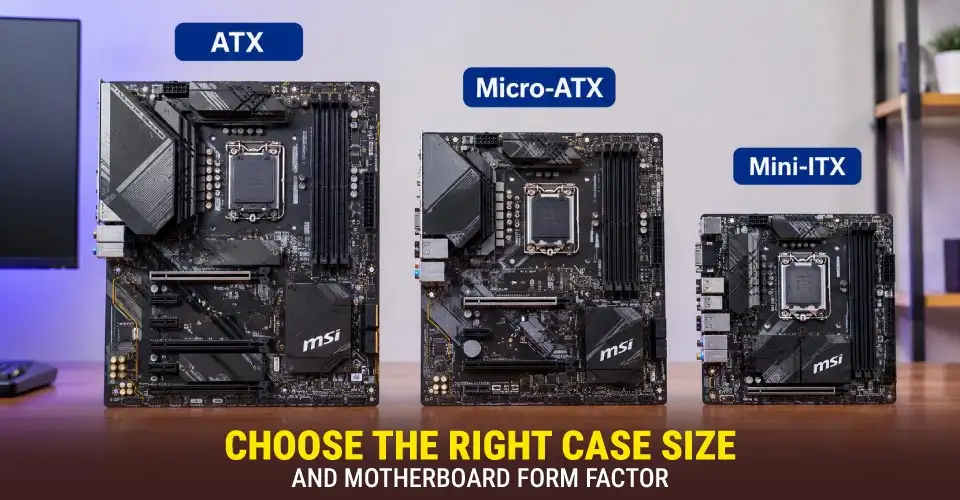
Choose the Right Case Size and Motherboard Form Factor
Full Tower, Mid Tower, and Mini Tower describe broad PC chassis sizes. But their dimensions and supported components vary by model.
Full Tower: Offers more room for large components, multiple drives, and complex cooling setups. It suits some high-end builds but takes up more desk space.
Mid Tower: A common choice for mainstream gaming PCs. Many models support ATX or Micro-ATX boards, but check the exact motherboard support.
Mini Tower: Often suits smaller builds using Micro-ATX or Mini-ITX boards. Component clearance and cable routing need extra attention.
Motherboard form factor matters just as much as the case label. ATX boards are generally larger and may offer more expansion slots. Micro-ATX boards are smaller and can be a practical choice for budget or mainstream gaming PCs. Mini-ITX boards are designed for compact systems, but small cases can make cooling and cable routing more difficult.
Some larger cases also support E-ATX motherboards. However, E-ATX dimensions and support can vary, so confirm the board's measurements and the case's listed compatibility.
Before choosing a case, compare your motherboard with the options in the gaming motherboard category. If you need more desk space, consider a compact build, but do not sacrifice essential GPU or cooler clearance just to make the PC smaller.
Check GPU Length, Thickness and Power-Cable Clearance
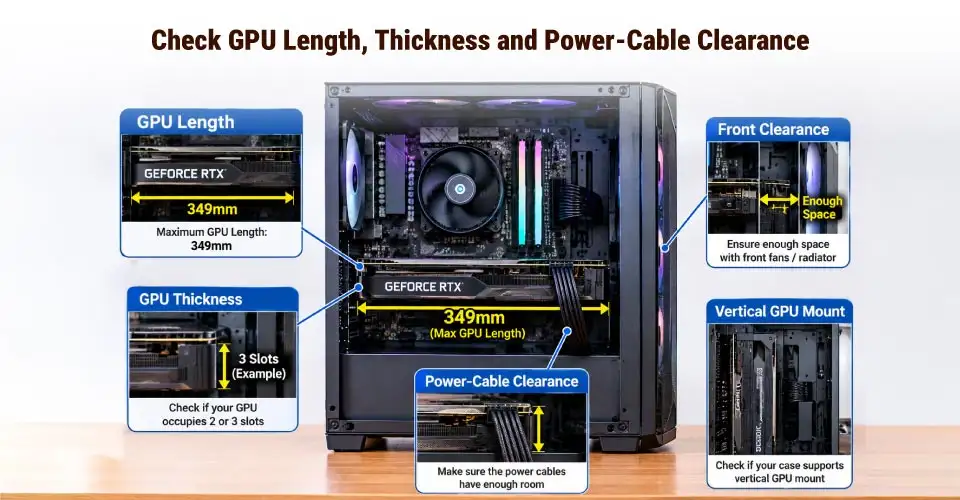
A gaming case for a large GPU needs more than enough length. Graphics cards vary in length, thickness, height, and power-connector position. A card may fit on paper but still create problems once the fans, radiator, or power cable are installed.
Check these points before buying:
GPU length: Compare the card's length with the case's maximum supported graphics card length.
GPU thickness: A thick graphics card may occupy three or more expansion-slot spaces. Make sure there is enough room around neighbouring slots and fans.
Power-cable clearance: Make sure the side panel leaves enough room for the power connector and cable.
Front clearance: Front fans or a radiator can reduce the space available for the graphics card.
Vertical GPU mount: Check whether the case supports vertical mounting and whether a compatible riser cable is included or sold separately.
Compare the exact card dimensions in the gaming graphics card category. Do not assume that every card using the same GPU chip has identical dimensions.
Match CPU Cooler Height and Radiator Support
For air cooling, compare the CPU cooler height with the case's maximum supported cooler height. If the cooler is too tall, the side panel may not close.
On the contrary, for an AIO liquid cooler, check the supported radiator size, such as 120mm, 240mm, 280mm, or 360mm, and confirm where it can be installed. A case may support a large radiator at the front but not at the top.
Radiator support does not guarantee that every combination will fit. Radiators and fans can conflict with RAM, motherboard heatsinks, or the graphics card. Compare the dimensions of your planned parts before buying.
You can browse the gaming CPU cooleroptions and check each cooler's specifications against the case. This is especially important for high-performance air-cooled and AIO builds.
Plan Airflow, Fan Support and Dust Control
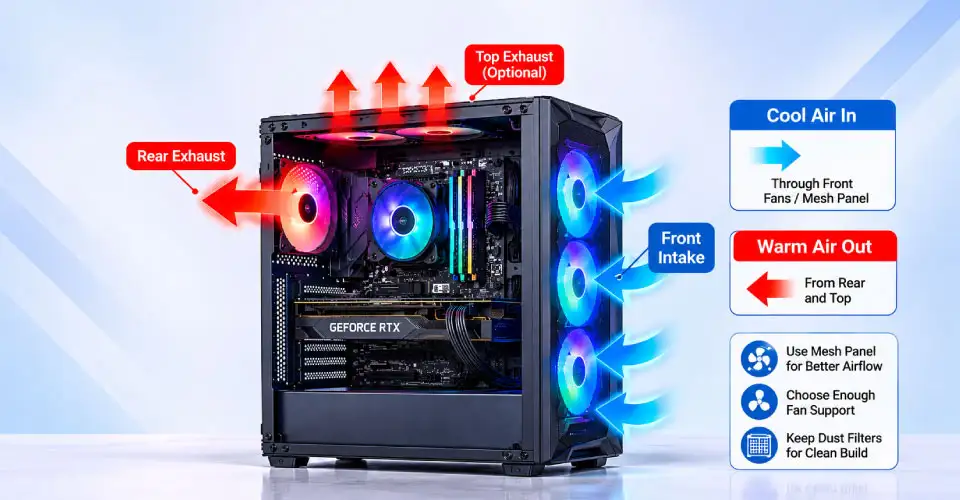
Gaming case airflow depends on ventilation, fan placement, and the complete internal layout, not simply the number of fans.
An intake fan pulls air into the case, while an exhaust fan pushes warm air out. Many builds use front or bottom intake and rear or top exhaust, depending on the case design. Check for:
Mesh front panel: Often provides a more open path for intake air than a mostly solid front.
Fan support: Confirm the positions and number of supported 120mm or 140mm fans.
Built-in fans: Check how many are included and where they are installed. A gaming case with built-in fans may reduce extra costs, but you may still need more.
Dust filters: Removable filters make routine cleaning easier.
Radiator support: Make sure the planned cooling arrangement leaves room for the GPU and other components.
More fans do not automatically mean better cooling. Plan the intake and exhaust layout, and include the cost of extra fans if needed.
Check PSU Size, Storage Bays and Cable Management
The power supply unit (PSU) needs suitable mounting space and room for its cables. Check the supported PSU form factor and maximum length. A long PSU or fixed drive cage can reduce the space available for cable routing.
Also check the number of supported 2.5-inch SSD and 3.5-inch HDD bays. Some cases have movable drive cages, while others use fixed layouts.
For cable management, look for routing holes, tie-down points, and space behind the motherboard tray. These features help organise power and front-panel cables and make later upgrades easier. If you plan to add storage or cooling hardware, check that the case can accommodate those changes. So, it’s better if you compare your power supply with the gaming power supplybefore choosing a case.
Front I/O and Other Useful Gaming Case Features
The front I/O panel determines which connections you can reach without moving your PC. If you regularly connect a headset, controller, external drive, or phone, check the location and number of ports before buying.
Useful features may include:
USB-A and USB Type-C: Check the exact ports provided and whether your motherboard has the required internal headers for them.
Audio ports: Useful for connecting headphones or a microphone directly to the case.
Fan hub or RGB controller: Some cases include a hub to connect multiple fans or lighting devices. Others require separate hardware.
Tool-less panels and removable filters: These can make upgrades and cleaning easier.
Vertical GPU mount: Useful for certain display-focused builds, provided the case and graphics card have enough clearance.
Back-connect support: A back-connect PC case has suitable cut-outs and space for compatible motherboards that place many connectors on the rear side. Not every case or motherboard supports this design.
RGB gaming casing can make a build look more personal. But check the lighting system before choosing. RGB and ARGB are not the same: ARGB typically allows individual LEDs to display different effects, while standard RGB commonly controls the lighting as a group. Check whether the fans use a compatible motherboard header or a separate controller.
Mesh vs Glass Gaming Case: Which Design Fits Your Build?
A mesh vs glass PC case decision depends on airflow, appearance, and cleaning preferences. Basically, a mesh front panel can allow air to enter more freely, depending on its design. It can suit builds that need strong airflow, but the fans, filters, and internal layout still affect the result.
Tempered glass lets you display components and RGB lighting. A glass side panel does not automatically mean poor cooling; the front ventilation and fan arrangement are more important. However, glass needs careful handling and regular cleaning.
Consider dust filters and access for maintenance as well. Mesh and filters can collect dust, so check how easily they can be removed. Choose the design that suits your components and cleaning habits rather than buying based on appearance alone.
Match the Case to Your Gaming Build
Use your planned hardware and available space to narrow down your options.
Build Type
What to Prioritise
Budget Micro-ATX
Board support, GPU clearance, included fans and price
Mainstream ATX
ATX support, cooler height, cable routing and storage
High-performance air-cooled
GPU clearance, cooler height and airflow
AIO liquid-cooled
Radiator size, mounting position and component clearance
Compact build
Mini-ITX or Micro-ATX support, desk space and cooling
For a budget build, avoid paying extra for RGB features you will not use. For a high-end system, check the graphics card and cooling hardware first. If you expect future upgrades, consider additional storage and fan support.
Compare available models in the gaming casing category. You should also check current stock, specifications, warranty details, and price before buying.
Common Gaming PC Case Buying Mistakes
Avoid these common mistakes when choosing a gaming PC case:
Wrong motherboard size: Confirm the exact supported form factors instead of relying on the case label.
Checking GPU length only: Include card thickness, power-cable space, and front fan or radiator clearance.
Ignoring cooler limits: Check air cooler height and radiator mounting positions.
Overlooking PSU space: A long power supply or drive cage can restrict cable routing.
Choosing fans by quantity: Fan placement and ventilation matter as much as the number installed.
Forgetting desk space: Measure the case location and leave room for cables and panel access.
Assuming radiator support guarantees a fit: Check clearance around RAM, heatsinks, and the GPU.
A few minutes spent comparing dimensions can prevent unnecessary replacements and installation problems.
Why Buy a Gaming Casing from Ryans?
Ryans provides a category where you can compare gaming casing options by features such as case type, supported motherboard size, built-in fans, radiator support, and back-connect compatibility. Product listings can also help you compare prices and available features before deciding.
Check the individual product page for the latest stock status, exact specifications, warranty information, and delivery details. You can also compare related components, including the gaming power supply category, before finalising your build. If you prefer a complete system rather than selecting each part yourself, browse the gaming PC category.
Frequently Asked Questions
Can I move my existing gaming PC parts into a smaller case?
Yes, if the case supports your motherboard and has enough space for the GPU, CPU cooler, PSU, and storage. Check each component's dimensions first. A smaller case may also offer fewer fan positions and less cable-routing space.
Can I add more case fans later if the casing includes only one or two?
Usually, if the case has unused mounting positions and supports the required fan sizes. Check available fan slots, motherboard headers, and any included fan hub. You may need a separate controller or splitter.
Do ARGB case fans need a compatible motherboard header or a separate controller?
They need a compatible ARGB connection or suitable controller. Check the fan connector and motherboard header before connecting them. Do not connect a 5V ARGB device to an incompatible 12V RGB header.
Can vertical GPU mounting affect graphics card airflow?
Yes. If the graphics card sits too close to the side panel, its fans may have less room to draw air. Check the case layout, available clearance, and whether a compatible riser cable is required.
Should I buy a gaming case that includes a power supply?
Only if the included PSU suits your components. Check its capacity, connectors, form factor, and warranty. Do not judge suitability by wattage alone; consider your complete build and planned upgrades.
What does back-connect motherboard support mean in a PC case?
It means the case is designed for compatible motherboards that place many connectors on the back. This can reduce visible cables inside the main chamber. Both the case and motherboard must support the relevant layout.

_1793515687.webp)














Leave a comment