On this page 9 sections
Key takeaways
- For regular color and photos: consider a refillable ink tank printer.
- For repeated black-text documents: a mono laser is a practical starting point.
- For long-term value: compare the consumables, page yield and your printing pattern.
Quick Answer: Ink Printer or Laser Printer?
Ink Printer for Color and Mixed Printing
Choose an ink printer if you regularly print assignments, color documents, graphics, charts, and photos. An ink tank model is particularly useful when you print color pages regularly because refillable ink bottles can keep running costs low.
Laser Printer for Regular Document Printing
Choose a laser printer if most of your printing involves black-and-white documents, invoices, reports, forms, and question papers. A monochrome laser printer handles repeated text-heavy jobs efficiently. Color laser printers are also available when you need color documents and presentations.
First Understand What an Ink Printer Means
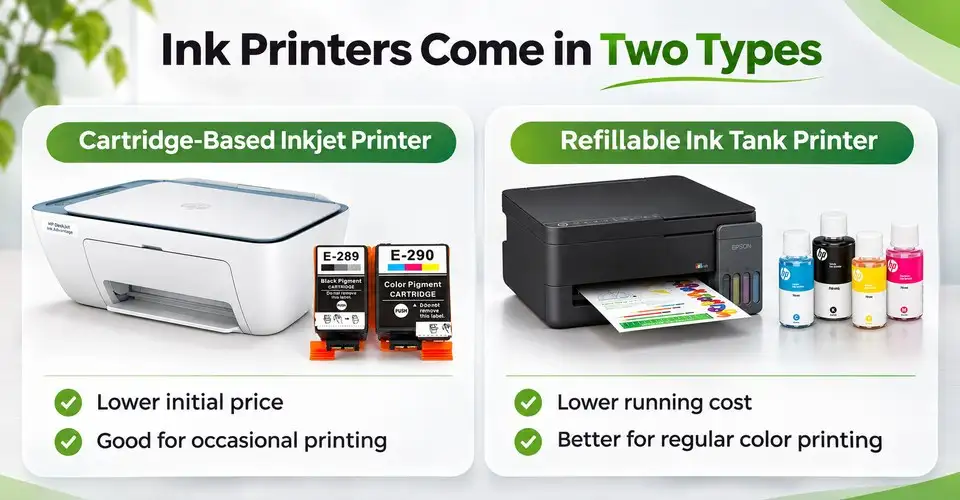
Ink printers generally come in two types. Both use liquid ink, but their consumable systems and running costs differ.
Cartridge-Based Inkjet Printer
A cartridge-based inkjet printer uses replaceable ink cartridges to produce printed pages. These printers often have a lower initial price, making them suitable for occasional home printing and light document work.
However, frequent cartridge replacement can increase long-term costs. Check the inkjet printer page if you need an affordable printer for light printing.
Refillable Ink Tank Printer
An ink tank printer uses built-in refillable tanks instead of frequently replacing small cartridges. You refill the tanks using compatible ink bottles, which can significantly reduce printing costs when you print regularly.
This makes ink tank printers practical for students, families, and small offices that need regular color printing. Check the ink tank printer page for available models.
Ink Printer vs Laser Printer: Main Differences
The main difference is the printing process. Inkjet printers spray liquid ink through a printhead, while laser printers use toner powder, a drum, and a fuser to produce printed pages.
Here's how these technologies fit different printing needs:
| Your Printing Need | Ink Printer | Laser Printer | Better Starting Direction | What to Check |
|---|---|---|---|---|
| Occasional home documents | Suitable for color and mixed printing | Suitable for black text | Choose by color needs | Consumable cost |
| Student assignments | Good for color projects | Good for text-heavy work | Ink tank or mono laser | Monthly printing pattern |
| Color school projects | Strong option for graphics | Available in color models | Inkjet | Color quality |
| Coaching question papers | Can handle regular printing | Strong for repeated black-text batches | Mono laser | Speed and toner yield |
| Office invoices and reports | Suitable for mixed documents | Strong for regular document work | Mono or color laser | Printing volume |
| Photos and graphics | Generally more suitable | Better for general color documents | Photo-capable inkjet | Print quality and paper support |
| Long periods without printing | Ink drying can become an issue | No liquid-ink drying issue | Laser for mostly black printing | Maintenance requirements |
Which Printer Fits Your Actual Work?
MATCH PRINTER TO WORK
Find a printer for your work
Choose where you print most. Open a use case to see a practical starting point and what to check.
01 Home & family Forms, photos and family documents View advice
Ink tank for regular color, or mono laser for occasional black text.
For family documents, assignments, charts and photos, an ink tank gives flexible color printing. If you print infrequently and mostly use black text, a compact mono laser is another sensible starting point.
02 Study Notes, assignments and projects View advice
Ink tank for diagrams and color projects; mono laser for text-heavy study.
If you print charts, color handouts or project pages often, prioritize regular-use color printing. For mostly black notes and assignments, compare monochrome laser costs and speed.
03 Coaching center Question papers and worksheets View advice
Mono laser for frequent black-text batches.
Repeated question papers, model tests and class notes call for reliable text output. Look at toner yield, printing speed, automatic duplex and paper-handling capacity. Compare an ink tank if you routinely need color worksheets.
04 Office Invoices, reports and documents View advice
Laser for regular business documents; consider color output when needed.
For reports, invoices and forms, compare monochrome laser printers. If your team prints color charts, weigh color laser and ink tank models against workload, connectivity and long-term consumable cost.
Home and Family Printing
An ink tank printer can handle assignments, online forms, family documents, charts, and occasional photos. If you rarely print and mostly need black-and-white documents, a compact mono laser printer can also make sense.
Think about how frequently you print before choosing a cartridge-based model. A low purchase price may not offer good value if you regularly replace expensive cartridges.

GOOD OPTION / HOME & FAMILY
HP Smart Tank 580 All-In-One Color Ink Printer
If you regularly print assignments, color documents, and family papers, the HP Smart Tank 580 is worth considering. It supports printing, scanning, and copying, with both Wi-Fi and USB connectivity. Its refillable ink system also makes it practical for regular color printing at home or in a small office.
Students and Study Work
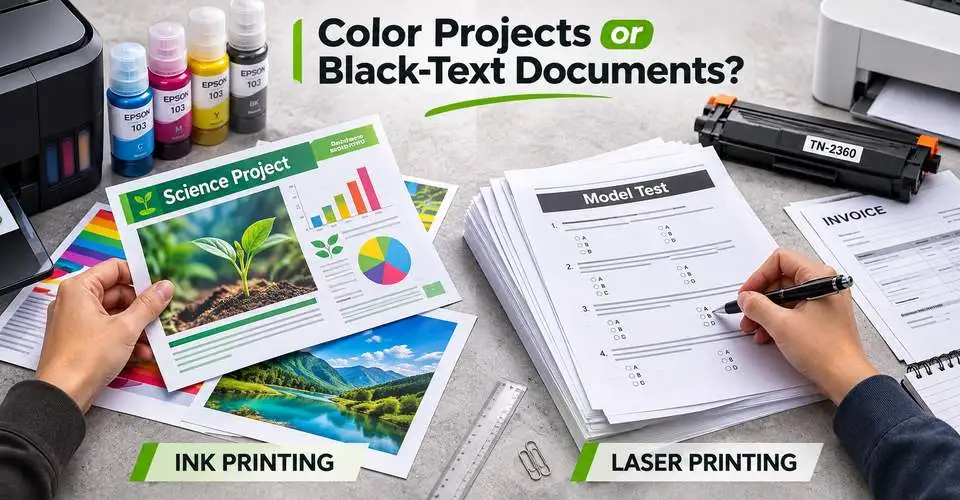
Students often print assignments, notes, charts, project pages, and reading materials. If you need colorful projects and diagrams, an ink tank printer offers more flexibility. But if almost everything contains black text, a mono laser printer can be a practical choice.
Coaching Centers and Schools
Coaching centers regularly print question papers, model tests, class notes, and notices. If most pages contain black text, a laser printer can handle repeated printing batches efficiently.
However, schools that regularly prepare color worksheets and graphics may benefit from an ink tank or color laser printer. Compare the actual workload and consumable costs before deciding.

RECOMMENDED MODEL / COACHING & OFFICE
Pantum P3010DW Single Function Mono Laser Printer
For coaching centers and offices that regularly print question papers, reports, and other black-and-white documents, the Pantum P3010DW is a practical option. It offers up to 30 ppm A4 printing, automatic duplex, and USB, LAN, and Wi-Fi connectivity. However, it supports printing only, so consider another model if you also need scanning or copying.
Office and Business Documents
For invoices, reports, quotations, forms, and other regular office documents, a laser printer is often a strong starting point. If your office also prints color presentations, charts, and graphics, compare color laser and ink tank models based on their running costs.
Which Costs Less to Run?
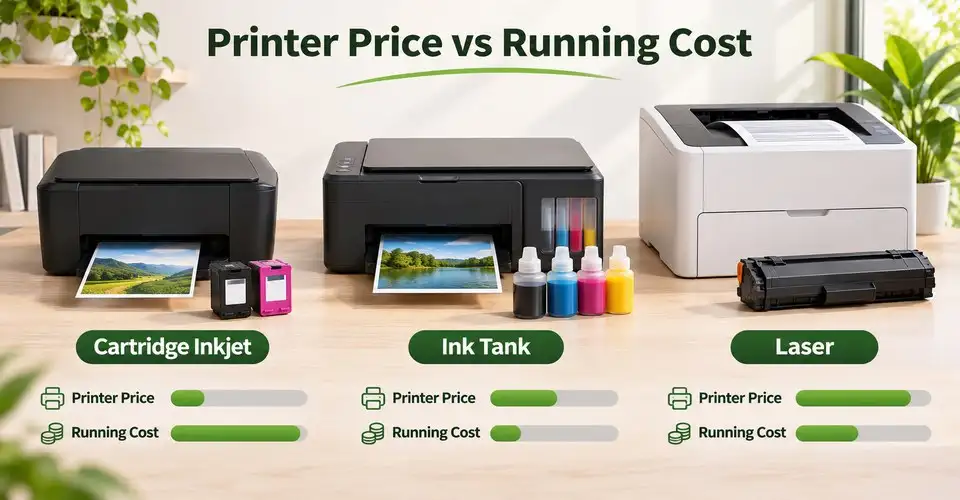
Running cost depends on the consumable system, page yield, printing frequency, and actual page coverage. You should not assume that every ink printer is cheaper or every laser printer offers a lower cost per page.
Ink Cartridge vs Ink Bottle vs Toner
Cartridge-based inkjet printers need replaceable cartridges, which can increase expenses when you print frequently. Ink tank printers use refillable bottles and can offer lower recurring costs for regular color printing.
Laser printers use toner cartridges instead of liquid ink. Their page yield can be high, particularly in document-focused models. Some laser printers also use separate drum units that require replacement over time.
Before buying, compare ink cartridges, ink bottles, and toner cartridges for your printer.
Page Yield and Cost Per Page
Page yield tells you approximately how many pages a consumable can print under standard testing conditions. Use this simple formula to compare running costs:
For example, if a toner cartridge costs Tk 2,000 and has a rated yield of 2,000 pages, the estimated consumable cost is Tk 1 per page.
Actual costs can vary depending on text density, color coverage, and printing conditions. Also include drum replacement costs when your laser printer uses a separate drum unit.
Text, Color and Photo Printing: Where Does Each One Win?
Black Text and Document Printing
Laser printers are generally a strong choice for sharp black text, invoices, reports, forms, and question papers. They are particularly useful when you regularly print large batches of documents.
Inkjet printers can also produce clear text, but compare their actual speed and consumable costs if document printing is your main requirement.
Color Projects, Graphics and Photos
Inkjet printers offer more flexibility for photographs, detailed graphics, school projects, and image-rich documents. Some models also support borderless photo printing.
Color laser printers can handle presentations, charts, and everyday color documents. However, if photo quality matters most, a suitable inkjet printer is generally the better starting point.
What Happens If You Do Not Print Regularly?
Your printing schedule also influence your decision, especially if you only print a few pages every month.
Ink Printer Maintenance
Liquid ink can dry around printhead nozzles when an inkjet printer remains unused for an extended period. This may cause missing lines, faded output, or nozzle clogging. The printer may then need a cleaning cycle, which can consume additional ink.
Laser Printer and Long Gaps Between Printing
Laser printers use dry toner powder, so you do not need to worry about liquid ink drying inside the print system. This makes them convenient when your printing schedule is irregular and most of your documents contain black text.
What to Check Before You Buy
Before choosing between an ink and laser printer, consider these practical points:
- Monthly printing volume: Estimate how many pages you print in a normal month.
- Color requirements: Decide whether you need black text, regular color documents, or photo printing.
- Consumable availability: Check the correct ink bottle, cartridge, or toner code and its availability in Bangladesh.
- Print speed: Compare the rated speed if you regularly print large batches.
- Multifunction needs: Consider scan and copy functions if you regularly handle office documents or study materials.
- Connectivity: Check USB or Wi-Fi if multiple computers and mobile devices need access.
You can compare different models in the Printer category and choose a setup that matches your daily workload and budget.
Final Advice: Choose by Workload, Not Printer Type Alone
Choose an ink printer when color, graphics, photos, and mixed printing are important. If you print color regularly, an ink tank printer can offer better long-term value than a cartridge-based inkjet.
On the other hand, a mono laser printer is a practical choice for repeated black-and-white documents, coaching question papers, invoices, and office reports. Choose a color laser if you also need regular color document printing.
Before purchasing, compare the printer, consumable cost, page yield, monthly workload, and local availability. The right printer is the one that handles your actual printing needs without unnecessary running expenses.











Leave a comment