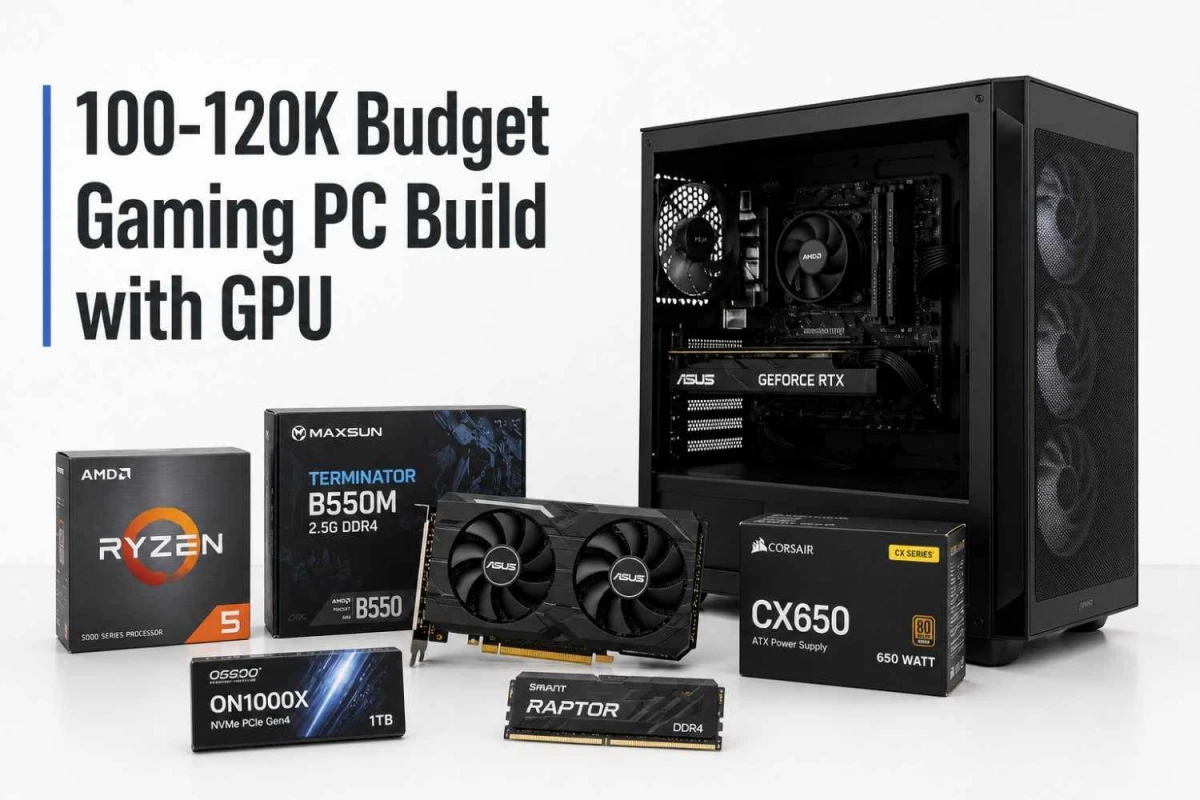
Yes, you can build a gaming PC with GPU inside Tk 100,000-120,000. As of 2026-05-06, treating the budget as CPU/tower only, the most balanced configuration I would suggest is:
- CPU: AMD Ryzen 5 5600
- Motherboard: MAXSUN Terminator B550M 2.5G DDR4
- GPU: ASUS Dual GeForce RTX 5050
- RAM: Smart Raptor 16GB DDR4 3200MHz
- SSD: OSCOO ON1000X 1TB M.2 2280 NVMe
- PSU: Corsair CX650 650W 80 Plus Bronze
- Case: MaxGreen PS195-15 ARGB Mid Tower
Using current Ryans product listings checked on 2026-05-06, these list of parts total cost around Tk 116,698 before any delivery, installation, offer, or stock change. That keeps the build inside the 100-120k target without using a weak PSU or tiny SSD.
Recommended Build with Price and Details
Ryans lists the Ryzen 5 5600 as a 6-core, 12-thread AM4 processor with 3.5GHz base, 4.4GHz boost, 35MB cache, DDR4-3200 support, PCIe Gen 4 support and included cooler. For a budget gaming PC, this is still a sensible CPU because it leaves more money for the graphics card.
A B550 board is the right match here because Ryzen 5 5600 can use PCIe Gen 4 on a compatible B550 platform. This board keeps the build affordable while still giving a better platform than the cheapest A520 option.
This is the heart of the build. Chipset - NVIDIA GeForce, Capacity (GB/TB) - 8GB, Graphics Resolution Max. - 7680 x 4320, VGA Port - No, HDMI Port - 1, Display Port - 3, Multi Display Capability - Quad Display, Body Color - Black.
16GB RAM is the minimum I would start with for a gaming PC in this budget. It is enough for esports, regular AAA gaming, browser plus Discord, and everyday multitasking. If budget allows later, upgrade to 32GB by adding another matching 16GB stick.
Do not build a 100k+ gaming PC with a 256GB or 512GB SSD unless you already own storage. Modern games are large. Type - Internal SSD, Storage - 1TB, Form Factor (Inch) - M.2 2280, Interface(s) - NVMe, Read Speed (Max.) - 7500MB/s, Write Speed (Max.) - 6500MB/s, Color - Graphene.
This is not the place to save aggressively. Ryans lists the Corsair CX650 as a 650W 80 Plus Bronze non-modular PSU with OCP, OVP, UVP, OPP, SCP and OTP protection, plus 6-year warranty. For this GPU class, a branded 650W Bronze unit gives comfortable headroom.
The case is not the performance hero, but airflow still matters. This model is listed with ATX support, 4 built-in ARGB fans, transparent side window and bottom-mounted PSU support. If you prefer a cleaner premium case, Montech AIR 100 Lite or AIR 100 ARGB are good stretch options.
Estimated total: Tk 1,16,898
Note: This estimate uses the checked listed prices only. Actual invoice can change because of availability, branch stock, online discounts, bundle conditions, installation charge, or price updates.
Why This Build Makes Sense
At 100-120k, the first mistake is overspending on the processor and then taking a weak GPU. For gaming, the GPU should get the biggest share of the budget. Ryzen 5 5600 is enough to drive a midrange GPU for 1080p high-refresh and decent 1440p gaming, while keeping the total cost controlled.
The second mistake is buying a cheap power supply. A poor PSU can make a good build unstable. A 650W Bronze unit from Corsair, Antec, Montech, SilverStone or another known brand is the safer direction.
The third mistake is taking only 512GB storage. With Windows, software, launchers and a few large games, 512GB fills quickly. A 1TB NVMe SSD makes the PC feel finished from day one.
What Performance Should You Expect?
This is best treated as a strong 1080p gaming PC. Esports titles should be comfortable at high refresh rates if paired with a suitable monitor. Modern AAA games should be playable at 1080p high settings, with some titles needing settings tuning because the GPU has 8GB VRAM. 1440p is possible in many games, but do not expect ultra settings everywhere.
If you mostly play Valorant, CS2, Fortnite, Apex, GTA, FIFA/EA Sports FC and popular online games, this build is more than enough. If your target is 1440p ultra in heavy new AAA games, you should either stretch the GPU budget or look for a 16GB GPU option.
Cheaper Version Closer to 100k
If you need to stay nearer Tk 100,000, cut in this order:
- Use a cheaper but still decent 650W Bronze PSU only if warranty and protection features are acceptable.
- Use a lower-cost airflow case.
- Use a cheaper 1TB NVMe SSD, but do not drop below 1TB unless absolutely necessary.
- Consider a lower-priced GPU only if the RX 9060 XT price rises or stock disappears.
Note: Do not cut by buying an unknown PSU. Do not cut by taking 8GB RAM. Do not cut by choosing a very poor motherboard with no upgrade comfort.
Should you go DDR5 instead?
DDR5 is better for future upgrade path, but current DDR5 board and RAM pricing can push this build over budget if you also want a strong GPU. For this exact 100-120k gaming-with-GPU query, DDR4 is acceptable because it protects the graphics card budget. If your budget becomes 130-140k, then Ryzen 5 7500F or Ryzen 5 7600 with B650 and DDR5 becomes more attractive.
Final Recommendation
For 100-120k, build around Ryzen 5 5600 and RX 9060 XT 8GB if the listed prices are available. Keep 16GB RAM minimum, 1TB NVMe SSD, and a branded 650W Bronze PSU. This is a balanced gaming tower, not a spec-sheet flex. It puts money where gaming performance actually comes from and leaves a simple RAM upgrade path for later.






Leave a comment