Many anticipated the standard improvements brighter screens, faster chips, and smarter AI when Samsung unveiled the Galaxy S26 lineup at its most recent Unpacked event. Indeed, all of those are present. However, increasing speed or brightness isn't the main feature, particularly with the Galaxy S26 Ultra. It has to do with something much more useful: privacy.
The fear of someone peeking at your screen isn’t unrealistic, especially when you’re checking messages on crowded buses or opening banking apps at work. Samsung aims to solve that with the S26 Ultra’s built-in Privacy Display, designed to reduce shoulder surfing.
What Is a “Privacy Display” ?
Privacy screens aren’t new. Many of us have tried stick-on privacy filters at some point. They darken the screen when viewed from the side, making it harder for others to see your content. The downside? They often reduce brightness, affect clarity, and permanently change how your screen looks.

Samsung’s approach with the S26 Ultra is different.
Instead of an external accessory, the Privacy Display is integrated directly into the screen. According to Samsung, it works by controlling how pixels disperse light. When Privacy Display is OFF, you get a normal flagship AMOLED viewing experience. When it’s ON, the screen limits visibility from side angles, reducing what others can see without permanently dulling or degrading the display.
Samsung calls it the mobile industry’s first built-in privacy display, and whether competitors follow quickly or not, it’s a bold move that changes how we think about smartphone security.
How Privacy Display Works in Real Life
On paper, “pixel-level privacy control” sounds impressive. But how does it actually help in daily life?
Samsung says users can control:
- When it activates for example, automatically when entering PINs or passwords.
- Which apps trigger it such as banking apps, email, or work-related tools.
- How strong it is with adjustable modes.
There are options like:
- Partial Screen Privacy – Ideal for protecting notification pop-ups or specific areas of the screen.
- Maximum Privacy Protection – Stronger side-view blocking for moments when you really don’t want prying eyes nearby.
Imagine you’re commuting in Dhaka traffic or sitting in a university library. You receive a banking OTP or open a confidential document. With Privacy Display enabled, someone sitting next to you won’t get a clear side-angle view of your screen.
It’s not about being secretive. It’s about having control.
The Display Specs: Privacy Meets Flagship Power
Of course, the S26 Ultra isn’t just about privacy. It still delivers a full premium display experience.
The Galaxy S26 Ultra features:
- 6.9-inch QHD+ Dynamic AMOLED 2X
- 120Hz adaptive refresh rate (1–120Hz)
- Vision Booster technology
This means you still get ultra-smooth scrolling, vibrant colors, deep blacks, and excellent outdoor visibility. The key difference? Now you can switch privacy on when needed instead of sacrificing display quality all the time.
In short, Samsung’s pitch is clear: You shouldn’t have to choose between a premium viewing experience and security.
Privacy in the AI Era: More Than Just the Screen
Samsung isn’t treating privacy as a single feature. With the Galaxy S26 lineup, it’s building what could be described as a “privacy stack.”
Beyond the display, Samsung highlights several security-focused features:
AI-Powered Call Screening
Unknown caller? The phone can identify and summarize intent before you even pick up.
Privacy Alerts
If an app with elevated privileges tries to access sensitive data like your location, call logs, or contacts you get a warning.
Private Album in Gallery
Selected photos and videos can be hidden from your main gallery view.
Knox Vault
Samsung’s hardware-level security isolation system, designed to protect sensitive information.
KEEP Encryption
App data encryption to prevent unauthorized access.
Together, these features protect not only what’s visible on your screen, but also what’s shared, accessed, and stored behind the scenes.
In an age where AI tools are more powerful than ever, Samsung seems to be positioning privacy as a core requirement not an optional extra.
Who Should Care Most About the Privacy Display?
The S26 Ultra’s Privacy Display won’t impact everyone equally. Its value depends heavily on how and where you use your phone.
You’ll likely benefit most if you are:
- A daily commuter using buses, trains, or rideshares
- An office worker in an open-plan workspace
- A student studying in libraries or shared study areas
- Someone who frequently checks banking apps, OTPs, emails, or work files outside home
For users who spend most of their time at home, the feature may feel like a bonus rather than a necessity. But for “always outside” users, it could become one of those features you don’t realize you needed until you have it.
Galaxy S26 Series Now at RYANS!
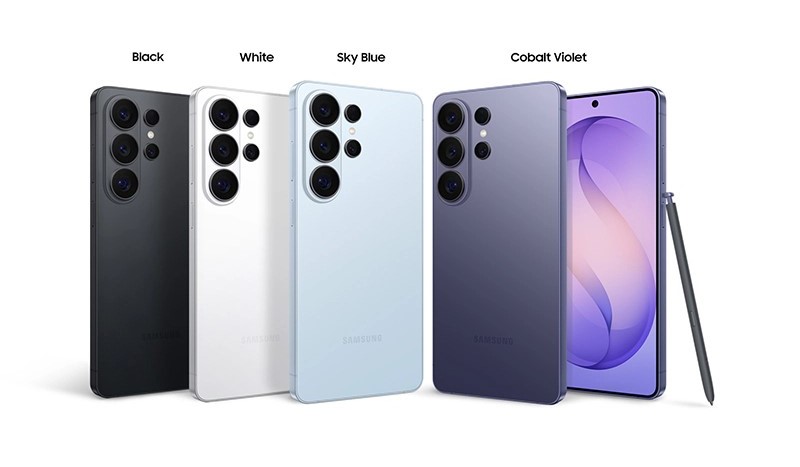
RYANS is excited to announce the pre-order of the newly unveiled Samsung Galaxy S26 Series. If you want a quick price snapshot before you decide, the pre-order lineup on Ryans currently includes Galaxy S26 Ultra (12/512) at Tk 199,999 (regular Tk 228,999) in colors like Cobalt Violet / Black / Sky Blue , Galaxy S26 Ultra (12/256) at Tk 179,999 (regular Tk 199,999) , Galaxy S26+ (Exynos) (12/256) at Tk 152,999 (regular Tk 172,499) , and Galaxy S26 (Exynos) (12/256) at Tk 120,000 (regular Tk 128,499) in colors like Cobalt Violet / Sky Blue . Secure your preferred model today and be among the first to experience Samsung’s latest flagship lineup—visit ryans.com, check Ryans’ Facebook page, or call 16810 for availability and pre-order support.
Final Thoughts
Samsung’s “Privacy Display” is shaping up to be one of the most talked-about features around the Galaxy S26 lineup, with the idea aimed at reducing side-angle visibility in public settings. While some users may see it as a niche addition, the feature targets a common real-world habit: people subtly tilting their screens to keep notifications, banking apps, or messages out of view. If it performs as intended, Privacy Display could signal a broader shift in display innovation beyond brightness, resolution, and refresh rate, pushing manufacturers to prioritize built-in, everyday privacy features as concerns around personal data and on-screen exposure continue to grow.
FAQs
1. Which models are included in the Galaxy S26 lineup?The Galaxy S26 series includes the standard Galaxy S26, the Galaxy S26+, and the Galaxy S26 Ultra.
2. Which model features Privacy Display?Privacy Display is currently exclusive to the Galaxy S26 Ultra.
3. What is Privacy Display designed to do?Privacy Display reduces side-angle visibility, making it harder for others nearby to view on-screen content in public spaces.
4. Where can buyers in Bangladesh pre-order the Galaxy S26?In Bangladesh, Ryans is taking pre-orders for the Galaxy S26 series, while availability and final official pricing may vary based on stock and warranty type.






Leave a comment