Mobile Gimbal Stabilizer for Video Recording: How It Can Improve Your Vlogging
Shooting videos with a smartphone is convenient, but handheld footage can still look shaky when you walk, turn, or move around. A mobile gimbal can help by keeping the phone steady while you record.
However, a gimbal is not a replacement for a good smartphone, lighting, or proper framing. Its main value is giving you better control over movement and making repeated shots more consistent.
For mobile vloggers, solo creators, travel vloggers, YouTubers, Shorts creators, and social media users, the right smartphone gimbal stabilizer can make handheld video recording easier without requiring a full camera setup.
What Does a Mobile Gimbal Actually Do While You Are Vlogging?
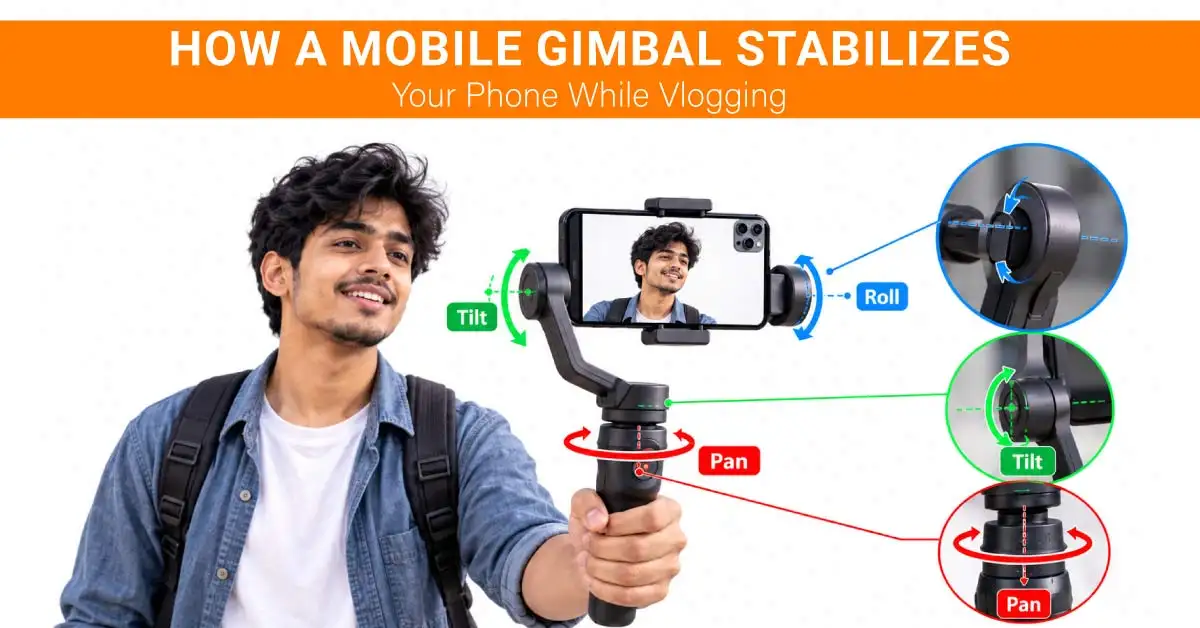
A mobile gimbal is a motorized phone stabilizer for video recording. It uses sensors and motors to counter unwanted hand movement while you record. A 3-axis gimbal stabilizer can control pan, tilt, and roll movement. This helps keep the phone's frame more level and controlled while you walk or change direction.
The difference becomes more noticeable when the phone is moving. A stationary talking-head video may not need a gimbal, but walking through a market, following someone, or recording a travel scene can benefit much more from stabilization.
A gimbal also gives you physical controls for starting or stopping recording, changing orientation, and controlling movement on supported phones and apps.
How a Mobile Gimbal Improves the Actual Vlogging Experience
The biggest benefit is not simply making footage smooth. It changes how easily you can record certain types of shots.
Your Moving Footage Becomes Easier to Watch
Walking while holding a phone naturally creates small movements. Even if your smartphone has OIS or EIS, some motion can remain visible.
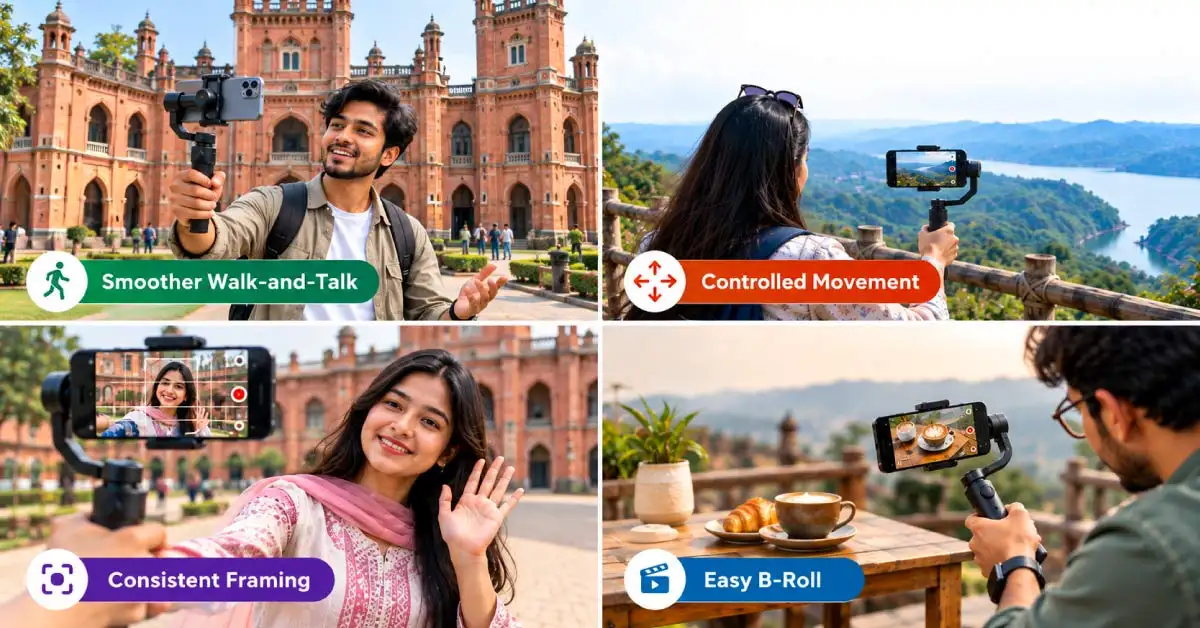
A gimbal can reduce these unwanted movements and make walk-and-talk footage, travel clips, and moving B-roll more comfortable to watch. This is particularly useful when you are moving continuously instead of standing in one place.
You Gain More Control Over Where the Viewer Looks
A phone gimbal lets you control the camera's movement more deliberately. Instead of accidentally pointing the phone up, down, or sideways while walking, you can keep the subject in a more consistent position.
This helps when you are showing a location, following another person, or moving from one subject to another. Additionally, that control can make your vlog footage feel more organised without requiring complicated camera equipment.
Your Shots Become More Consistent
If you record several clips during a vlog, inconsistent movement can make them feel disconnected.
A smartphone gimbal can help maintain a similar camera position and movement style across different shots. This is useful when recording product demonstrations, travel footage, tutorials, or several clips for one YouTube video.
The improvement is not about making every shot perfect. It is about reducing unnecessary movement that you would otherwise need to manage while filming.
You Can Capture Better B-Roll Without Carrying a Full Camera Setup
A phone, gimbal, and small accessories can be much easier to carry than a camera body, lens, and larger stabilizer.
You can use a mobile gimbal to capture:
Walking shots
Slow camera movements
Product demonstrations
Location footage
Vertical social-media clips
Follow shots
Simple cinematic B-roll
For creators who already use a good smartphone, this can be a practical way to improve phone video recording without moving to a dedicated camera.
A Gimbal Changes More Than Stability When You Vlog Alone
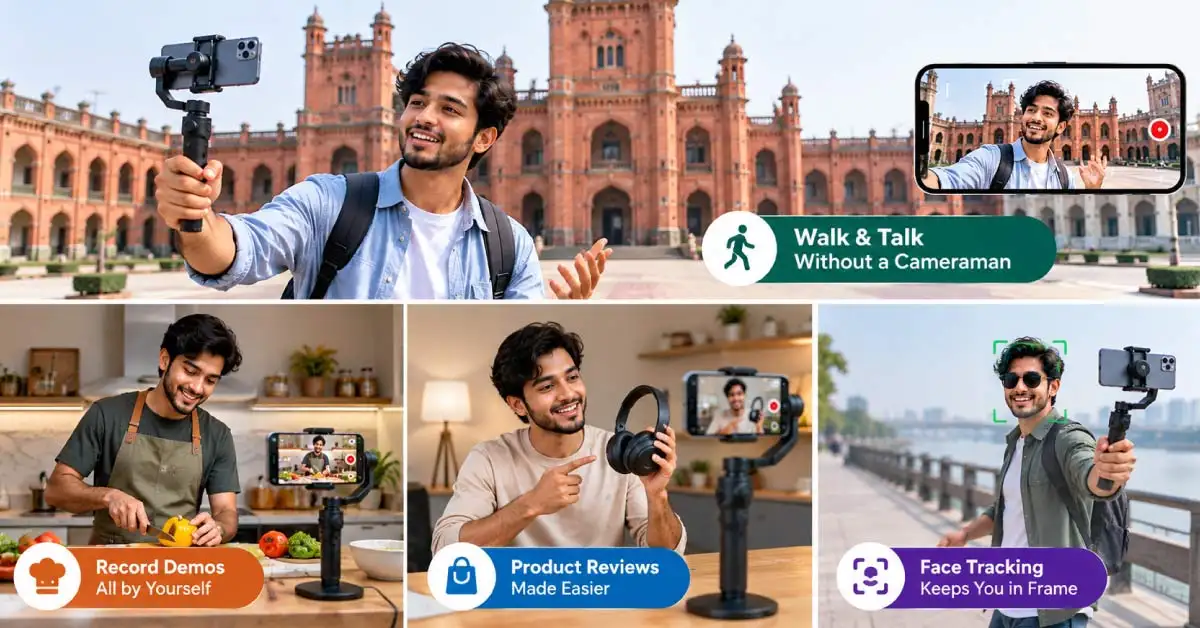
A gimbal becomes particularly useful when you record without another person operating the camera.
For example, imagine you are recording a cooking demonstration. You need to talk, move around the kitchen, show the ingredients, and demonstrate the process. A smartphone mounted on a tripod can work for a fixed shot, but a gimbal gives you more flexibility when you need to move.
The same applies to fitness content. You may need to move from one exercise to another while keeping yourself within the frame.
For travel vlogging, a gimbal can make it easier to record yourself while walking through a new location. For product demonstrations, it can help you move around the product without introducing unnecessary camera shake.
This is where features such as face tracking can become useful. A compatible gimbal can follow your face or subject, allowing you to move without constantly repositioning the phone.
For solo creators, that can reduce the need for another person behind the camera.
Where Will You Notice the Biggest Improvement in a Vlog?
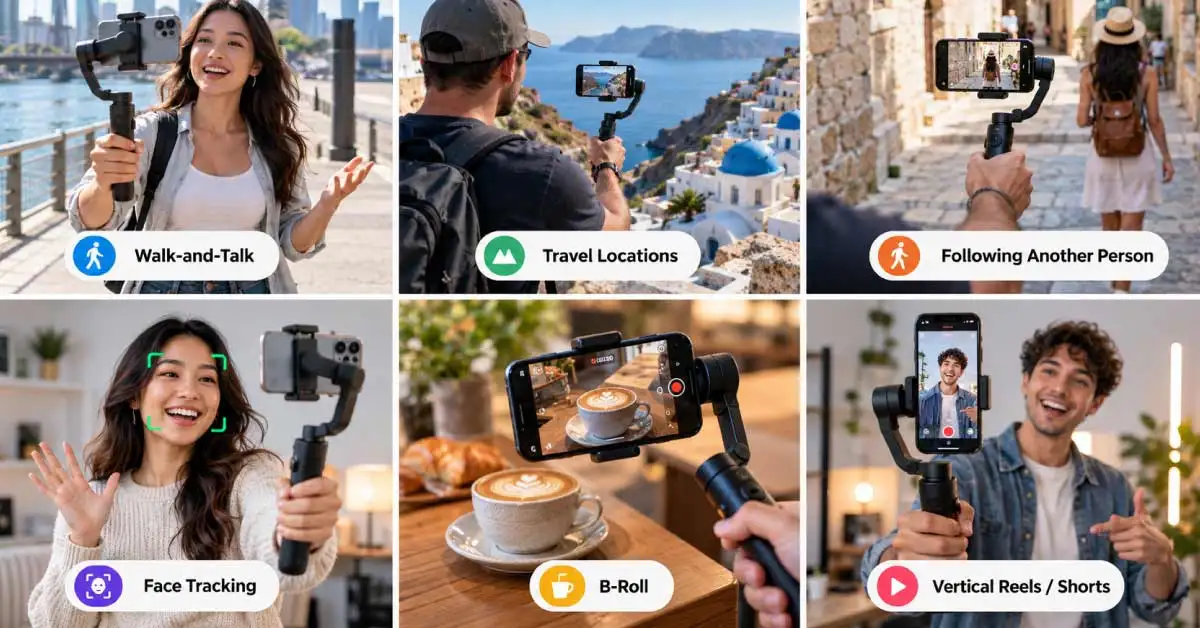
The value of a mobile video stabilizer depends heavily on how you shoot. You are more likely to notice the difference in these situations:
Walk-and-talk: If you speak to the camera while walking, stabilization can reduce unwanted movement.
Travel locations: Moving through streets, markets, parks, or tourist areas creates more natural camera movement.
Following another person: A gimbal can help maintain a more controlled frame while moving behind or beside someone.
Filming yourself: Face tracking can help keep you in the frame when you move.
B-roll: Slow movements around food, products, buildings, or locations can look more controlled.
Vertical content: If you create Reels, Shorts, or other vertical videos, a gimbal can make moving shots easier to manage.
If most of your videos are recorded while sitting at a desk, however, you may notice less benefit.
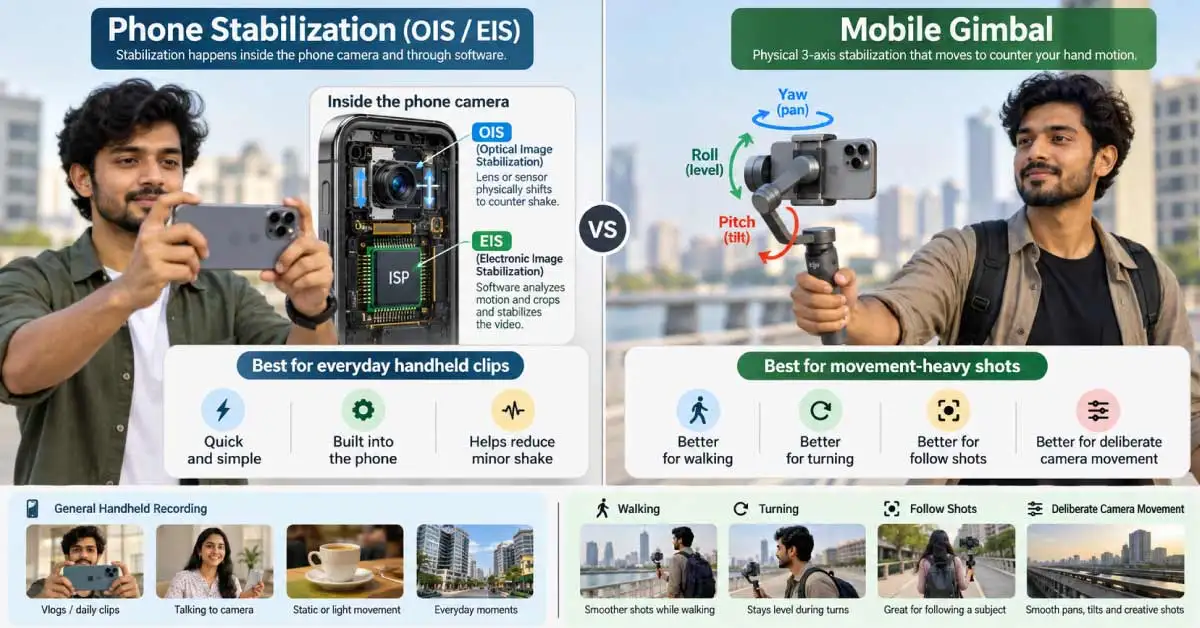
My Phone Already Has Video Stabilization. Do I Still Need a Gimbal?
Modern smartphones may already have optical image stabilization (OIS) and electronic image stabilization (EIS). These features can reduce camera shake, especially when recording handheld.
So, why buy a gimbal?
The two approaches are different. Phone stabilization works mainly through the camera and software. A gimbal physically moves the phone to counter unwanted motion.
A gimbal becomes more useful when you are walking, turning, following a subject, or creating deliberate camera movements.
You do not necessarily need one just because you want smoother video. If your phone already produces stable footage and most of your videos are stationary, spending money on a gimbal may provide little practical benefit.
What a Mobile Gimbal Will Not Improve
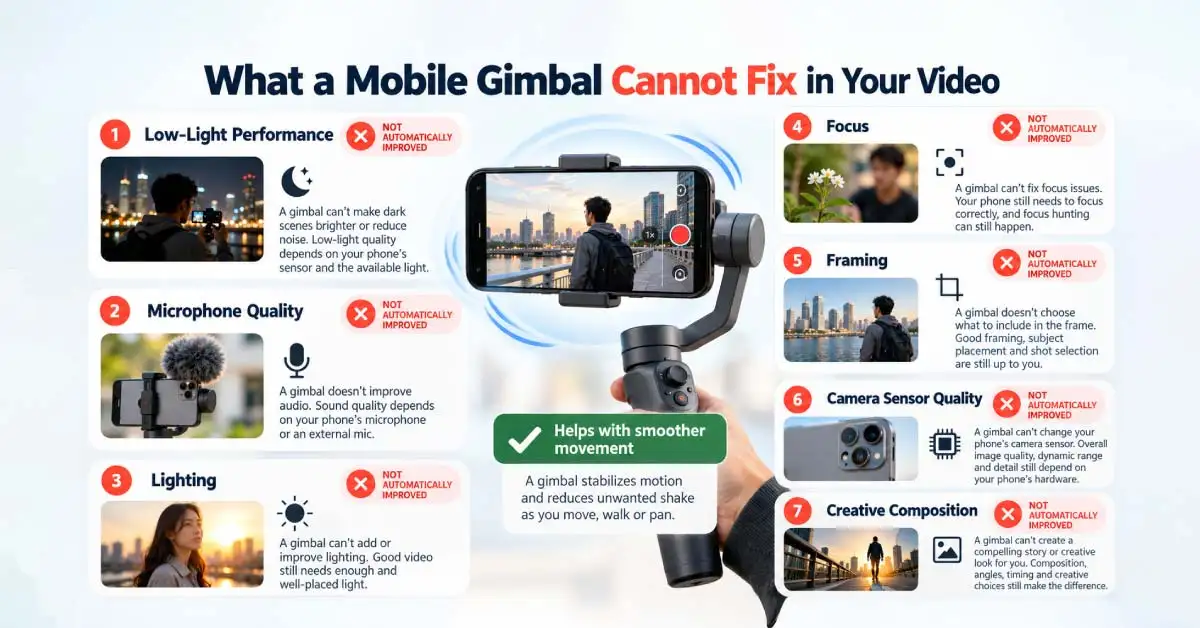
A gimbal cannot fix every problem in your video. It will not automatically improve your phone's camera sensor, dynamic range, low-light performance, microphone quality, or lighting.
If your video is too dark, a gimbal will not make the lighting better. If the composition is poor, stabilization will not fix it. If the subject is out of focus, the gimbal cannot correct the original recording.
It also cannot turn every movement into professional-looking footage. You still need to think about framing, camera direction, walking speed, background, lighting, and the purpose of each shot. This is why you should treat a gimbal as a shooting tool, not as a complete video-quality upgrade.
How to Get the Improvement You Expect From a Gimbal
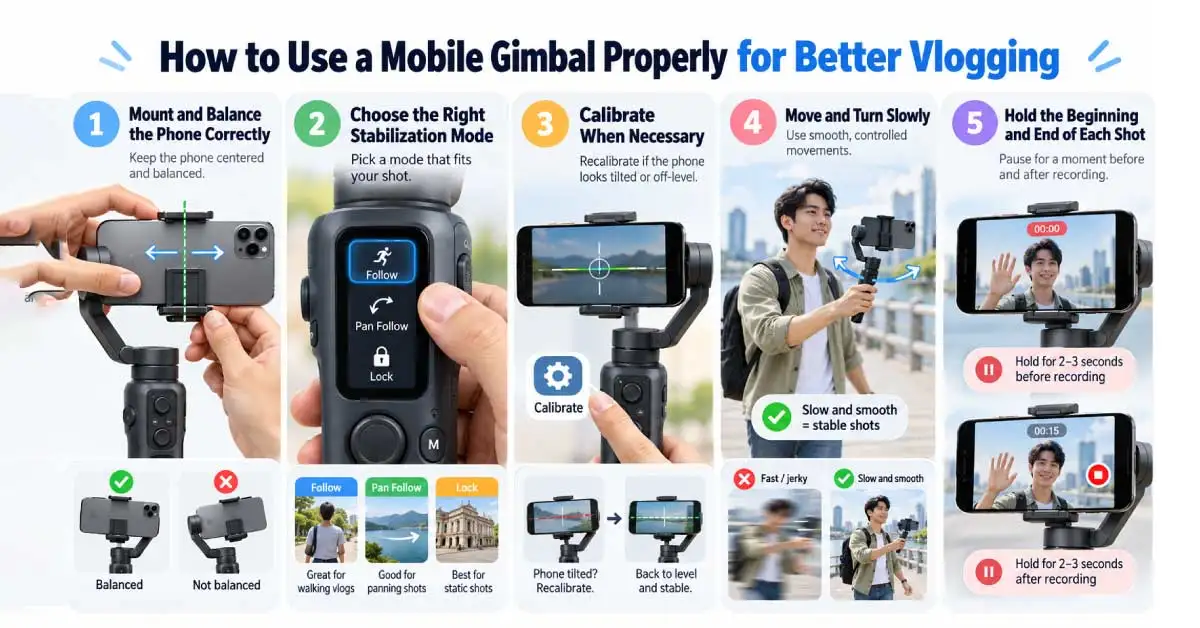
Buying a gimbal is only the first step. You need to set it up correctly.
Mount and Balance the Phone Correctly
Attach the phone securely before turning on the motors. Proper phone balancing reduces the work required from the motors and helps the gimbal operate correctly. A phone that is mounted too far to one side can affect performance.
Use the Right Stabilization Mode
Different modes are designed for different movements. A follow mode may be useful for walking, while a locked mode can help maintain a more fixed camera direction. Take some time to test the available modes before recording an important vlog.
Calibrate When Necessary
If the gimbal does not hold the phone level or behaves differently from normal, perform gimbal calibration according to the manufacturer's instructions.
You should also check whether your phone is within the gimbal's supported size and weight range.
Move More Slowly Than You Normally Would
A gimbal can reduce unwanted shake, but it cannot completely hide sudden movements. Walk smoothly, turn gradually, and avoid making quick changes in direction. This gives the stabilizer a better chance to maintain a controlled frame.
Hold the Beginning and End of Each Shot
Do not immediately start moving after pressing the record. Hold the phone steady for a moment before and after the main movement.
This gives you cleaner points to cut during editing.
Do Not Let Stabilization Replace Good Creative Decisions
A perfectly stable shot can still be boring.
Think about what the viewer should see, where you want the camera to move, and why you are making that movement. Stabilization should support your storytelling rather than replace it.
Is a Mobile Gimbal Worth Adding to Your Vlogging Setup?
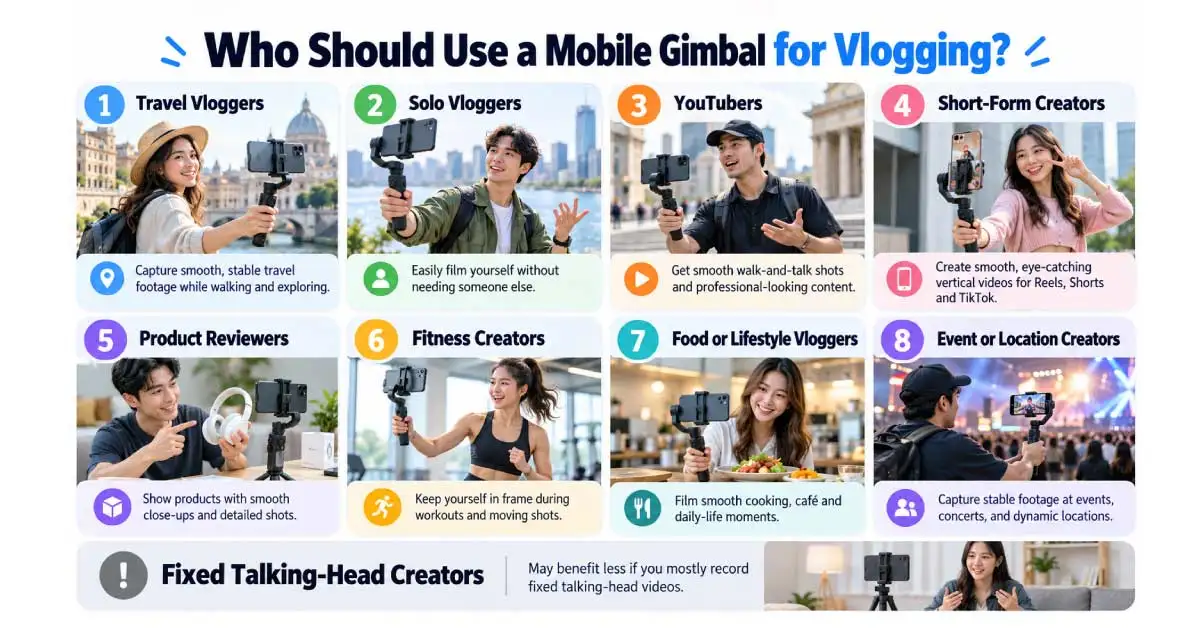
A mobile gimbal for vlogging can be worth buying if you regularly record while moving. It would be useful for:
Travel vloggers
Solo vloggers
YouTubers
Short-form content creators
Product reviewers
Fitness creators
Food and lifestyle vloggers
Event and location creators
It may not be necessary if you mainly record talking-head videos from a fixed position.
Your smartphone also matters. If your phone has a good camera and you already like its video quality, a gimbal can add useful movement control. If your phone produces poor video in your normal shooting conditions, upgrading the phone may have a larger impact.
Also consider portability. A compact gimbal is easier to carry during travel, while a larger model may offer more features but take up more space.
Where to Buy an Authentic Mobile Gimbal Stabilizer
Ryans currently lists smartphone gimbals from brands such as DJI, Hohem, WiWU, Baseus, and others. Its current category includes models ranging from about Tk 5,300 upward, depending on the type and features.
For example, the DJI Osmo Mobile 7P is currently listed as a 3-axis smartphone gimbal with a built-in selfie stick and tripod, while the Hohem iSteady V3 also combines 3-axis stabilization with a built-in selfie stick and tripod.
You can compare the latest mobile gimbal price in Bangladesh before choosing a model. Check the individual product page for current price, stock, compatibility, package contents, and warranty because these details can change.
If you already have a specific phone, check its dimensions and weight against the gimbal's supported range before ordering.
Conclusion
A smartphone gimbal is most useful when your videos involve movement. It can make walking shots, travel footage, B-roll, solo vlogging, and follow shots easier to control.
However, you should not buy one simply because it promises smoother video. First consider how you actually record. If you mostly sit in one place, your phone's built-in stabilization may be enough. If you regularly move while filming, a 3-axis stabilization system, face tracking, proper phone balancing, and easy controls can make a noticeable difference.
For Bangladesh buyers, compare the complete setup rather than the gimbal price alone. A model that supports your phone, fits your shooting style, and comes with useful accessories and warranty support is more important than simply choosing the most feature-rich option.
Frequently Asked Questions
Can I use a phone case while recording with a mobile gimbal?
It depends on the gimbal and case thickness. A thick or heavy case can affect phone balancing and may exceed the supported weight. If the manufacturer recommends removing the case, do so before mounting the phone.
Can I use an external microphone while my phone is on a gimbal?
Usually, yes, but compatibility depends on the phone, microphone, cable, and gimbal design. Check whether the cable can move freely without hitting the gimbal arm. Wireless microphones can be convenient for mobile vlogging because they reduce cable movement.
Can I use my phone's native camera app with a mobile gimbal?
Basic stabilization can work with the native camera app, but some gimbal features may require the manufacturer's app. Face tracking, gesture controls, zoom controls, and certain shooting modes may have specific compatibility requirements.
Does using a gimbal drain my phone battery faster?
A gimbal itself uses its own rechargeable battery, but some connected features can increase phone power use. Continuous recording, Bluetooth, screen brightness, and tracking can also affect smartphone battery life. Carry a power bank for longer shoots.
Can I attach lenses to my phone while using a gimbal?
You can only do this if the added lens and phone setup remain within the gimbal's supported weight and dimensions. A heavy external lens can change the balance. Check compatibility before attaching accessories.















Leave a comment