Toner vs Drum Unit: What is the Difference and Which One Should You Replace?
If your laser printer shows a warning or starts producing poor prints, the toner or drum unit may need attention. These two parts work together to generate high-quality prints but perform different jobs.
The toner cartridge stores toner powder, while the imaging drum transfers that powder onto paper. Knowing the difference can help you replace only the part that is actually worn. This guide explains toner vs drum unit, common warning signs, replacement costs, and what to check before buying a new part in Bangladesh.
Quick Answer: Replace Toner or Drum Unit?
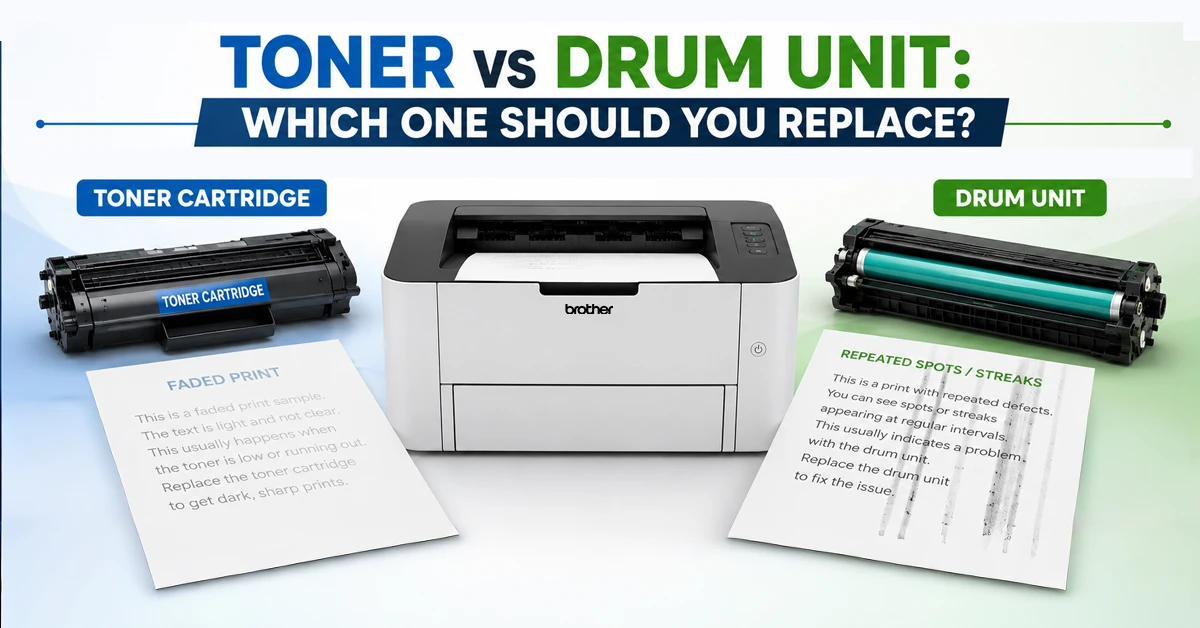
You may need to replace the toner when the printer reports low toner or printed pages become light. On the other hand, replace the drum when you see repeated marks, streaks, spots, or other image defects.
Replace Toner When the Powder Runs Low
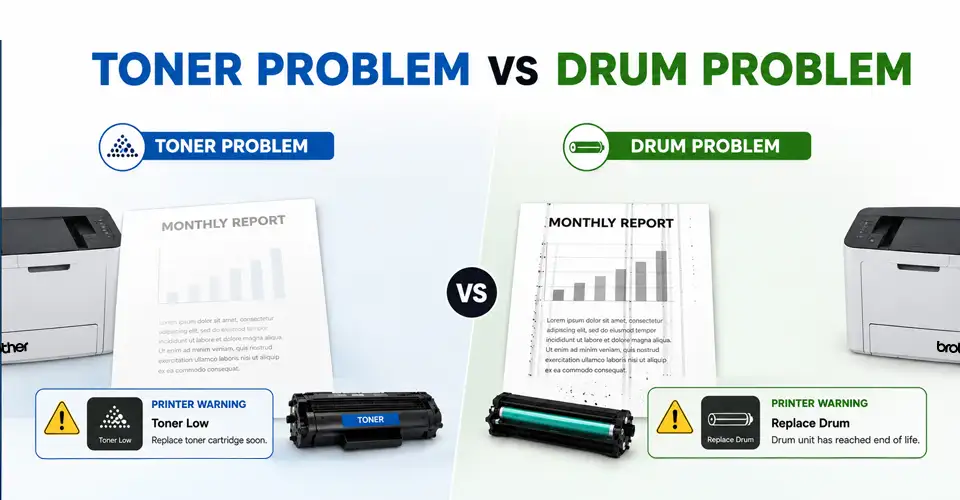
A toner cartridge contains toner powder used to create text and images. When the powder runs low, prints may become pale or uneven. The printer may show messages like Toner Low, Replace Toner, or a similar warning. You may also notice faded text or lighter areas on printed pages. However, before replacing it, check the toner code and printer model. This helps you select the correct toner cartridge for your laser printer.
Replace the Drum When Image Transfer Wears Out
The drum unit is responsible for transferring the toner onto the paper. It uses a photosensitive surface and an electrostatic charge to attract toner. However, a worn drum can cause repeated marks, streaking, ghosting, black spots, or faded areas. Your printer may also show errors like Drum End Soon or Replace Drum. If the toner still has enough powder but these problems continue, the drum may be the part that needs replacement.
Toner vs Drum Unit: Technical Comparison
Features
Toner Cartridge
Drum Unit
Key purpose
Stores toner powder
Create and transfer the images
Main component
Toner powder
Photosensitive drum
Replacement frequency
Usually more frequent
Usually less frequent
Common warning
Toner Low/Replace Toner
Drum Ends Soon/Replace Drum
Common problems
Faded or light print
Streaks, spots, ghosting
Replacement cost
Lower
Higher
Reset needed
Depends on printer
Often requires drum counter reset
Which Part Should You Replace?
Check the Printer Warning
Look for the printer's display or consumable-status page. Look for messages such as Toner Low, Replace Toner, Drum End Soon, or Replace Drum. These warnings can help identify which consumable needs attention. However, the exact message and reset process depend on the printer model.
Check Toner and Drum Life Separately
If your printer uses separate units, check the toner level and drum life independently. But if the toner is low but the drum still has plenty of remaining life, replacing the drum is unnecessary. The same applies when the toner level is healthy but the drum has reached its expected life.
Review the Last Replacement
Before replacing the toner or drum, check when the last replacement was installed. If the toner was replaced recently, the problem may be related to the drum or another printer component. For the drum, check its expected service life and the number of pages printed since the last replacement. This can help you avoid replacing a drum that still has useful life remaining. Also, review your previous cartridge or drum model and compare it with the new one. This makes it easier to confirm that you are buying the correct replacement for your printer.
How Toner and Drum Units Work Together
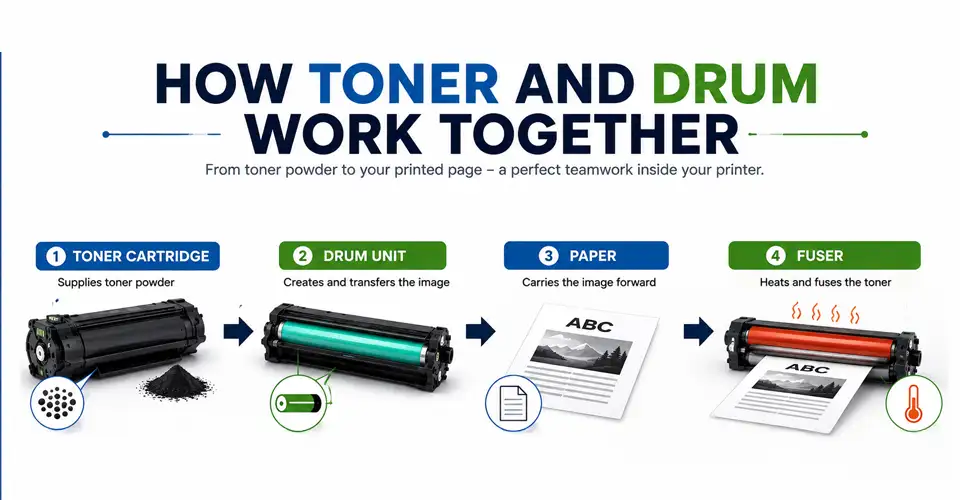
During the printing process, toner and drum units work together to complete the process. But they're not the same component and do not always need replacement at the same time. The process begins when the printer creates an image using a laser beam. Then the drum uses an electrostatic charge to form the image pattern. Toner powder sticks to this pattern and moves onto the paper through image transfer. The fuser then uses heat and pressure to fix the toner onto the page.
Separate vs Combined Cartridge Design
Some laser printers use a separate toner and drum system. You replace the toner cartridge when the powder runs out and replace the drum when its service life ends. Other printers use an integrated cartridge that combines toner and drum components. In that design, both parts are replaced together.
Check your printer manual or existing cartridge to identify which design your printer uses. Faded print can sometimes come from toner, the drum, or another part of the printer. Repeated marks at similar distances may point toward the drum. A general loss of darkness across the whole page is more likely to indicate low toner.
The fuser can also cause problems when toner does not properly bond to the paper. If the symptoms remain after replacing the correct consumable, further printer inspection may be necessary.
What to Check Before Buying a Replacement
Before buying a replacement toner or drum unit, check more than the product name. The wrong consumable may not work with your printer.
Printer Model and Consumable Code
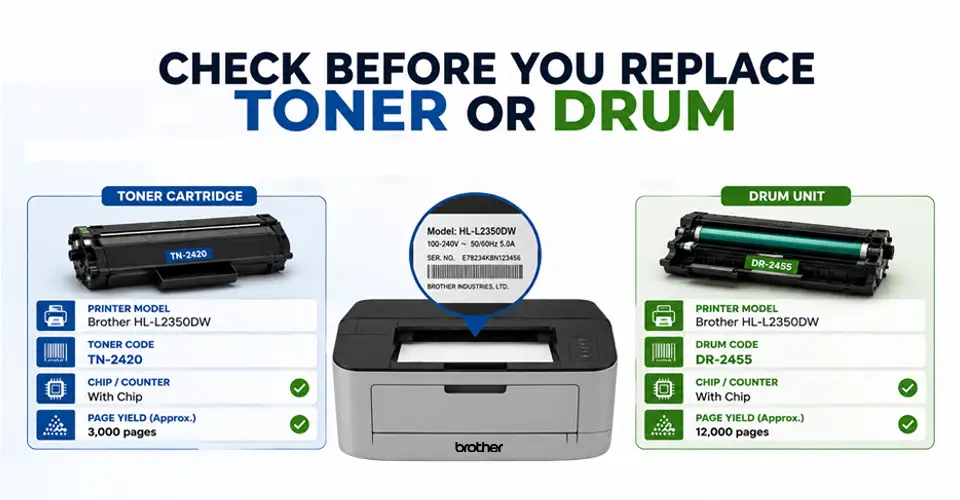
Check the exact printer model, toner code, and drum code. Two cartridges may look similar but support different printer models. For example, a Brother, HP, Canon, or Pantum printer may require a specific consumable code. Always confirm compatibility before ordering. Ryans offers categories for toner cartridges, drum units, andprinters, making it easier to compare compatible consumables.
Page Yield and Drum Life
Page yield tells you approximately how many pages a toner can print under the stated test conditions. In contrast, drum life shows how many pages the drum is designed to handle. However, actual results can vary because of print density, page coverage, and document type. You can compare the toner price in Bangladesh with its page yield to estimate the cost per printed page.
Chip and Counter Requirements
Some cartridges and drum units use chips for identification or status tracking. Check whether the replacement supports the required chip or counter system. This is especially important for third-party or compatible consumables.
Common Toner and Drum Replacement Mistakes
Replacing Both Parts Without Checking
A common mistake is replacing the toner and drum together when only one needs replacement. Check the printer warning and printed output first. Replace only the consumable that is actually worn.
Resetting the Drum Counter Incorrectly
Resetting the drum counter does not make an old drum new again. After installing a new drum, use the correct reset procedure for your printer model. Avoid resetting the counter without replacing the drum.
Touching or Exposing the Drum Surface
The drum surface is sensitive and should be handled carefully. Avoid touching the photosensitive drum with your fingers. Oil, dirt, scratches, and strong light can affect the drum surface. Follow the cartridge manufacturer's handling instructions when installing a new unit.
Final Advice: Replace Only the Worn Consumable
The key difference in toner vs drum unit is simple: toner provides the powder, while the drum helps create and transfer the image. If the toner is low, replace the toner. If the drum has reached its service life or causes repeated print defects, replace the drum. Before buying, always check the printer model, toner or drum code, page yield, compatibility, and chip requirements.
This simple check can help you avoid buying the wrong consumable and spending more than necessary. For compatible options, you can explore Ryans toner cartridges and Ryans drum units. You can also check Ryan's printerswhen choosing consumables for a new printer.
Frequently Asked Questions (FAQs)
Why does my printer still show Replace Drum after installing a new toner?
Toner and drum units are different consumables. Installing new toner will not normally reset a drum warning. If the printer still shows Replace Drum, check whether the drum needs replacement or its counter needs to be reset.
Will replacing toner fix streaks, spots, or repeated marks?
Not always. These problems can come from a worn or damaged drum, dirt, or another printer component. If the marks repeat at regular intervals, the drum may need inspection.
How can I check whether the drum is built into the toner cartridge?
Check the printer manual, cartridge specifications, or the existing cartridge. The manufacturer's product information should state whether the printer uses a separate drum or an integrated cartridge.
Can touching the photosensitive drum surface damage print quality?
Yes. Touching the photosensitive drum can leave oil or dirt on its surface and affect the print. Handle the drum carefully and follow the manufacturer's installation instructions















Leave a comment