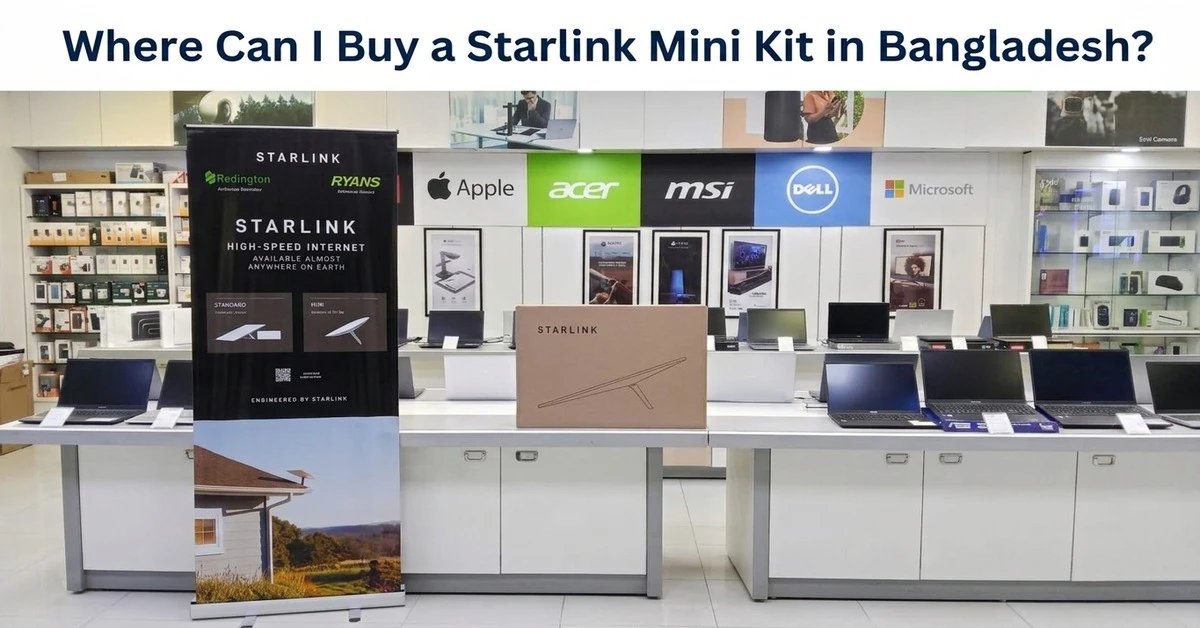
You can buy a Starlink Mini Kit in Bangladesh from Ryans Computers through online ordering or available physical branches. The Mini is a compact satellite internet kit designed for places where regular broadband, fiber, or stable mobile internet may not be practical.
Buying the hardware is only the first part of the process. You also need a suitable Starlink service plan, a location with a clear view of the sky, and a reliable power source. Your installation type may also require extra mounting, cable, or travel accessories.
This guide explains where to buy the Starlink Mini in Bangladesh, what comes with the kit, what to prepare before buying, how the service works, and which extra items may be useful for your setup.
Is the Starlink Mini Kit Officially Available in Bangladesh?
Yes. Starlink service and hardware are officially available in Bangladesh, so buyers no longer need to depend only on unofficial imported devices.
Ryans Computers is one of the local retail channels where buyers can purchase Starlink hardware. You can also check the available Starlink satellite internet devices if you want to compare different Starlink options before deciding.
Buying through an established local retailer also makes it easier to check:
- Product availability
- Hardware specifications
- Package contents
- Warranty information
- Purchase records
- Related accessories
It is still important to understand that buying the Starlink device and subscribing to Starlink internet are separate steps.
Where to Buy a Starlink Mini Kit in Bangladesh
You can purchase the Starlink Mini from Ryans online or check whether it is available at a nearby Ryans store.
Buy Starlink Mini Kit Online from Ryans
Online ordering is useful if you already know the Mini suits your needs.
Before ordering, check the live product information for:
- Current availability
- Current hardware price
- Warranty
- Package contents
- Delivery options
- Payment methods
- Product specifications
If you prefer to pay over several months, you can also review the current Ryans EMI facility and its applicable conditions before placing the order.
Stock and offers can change, so always use the current product page rather than depending on an older price screenshot or social media post.
Buy Starlink Mini from a Ryans Branch
You may also prefer visiting a physical store, especially if you want to discuss the hardware or installation needs before buying.
Ryans has stores in Dhaka and several other major cities. Instead of travelling to a store without checking first, use the Ryans branch directory to find the nearest location and its contact information.
Product availability can be different from one location to another, so checking before travelling can save time.
Why Buy Starlink Mini from an Authorized Retail Channel?
A Starlink Mini is not a small everyday accessory, so choosing a reliable seller matters.
Authentic Starlink Hardware
Buying through an established retail channel reduces the risk of receiving a questionable imported unit, previously used hardware, or a product with unclear purchase history.
Clear Purchase Record
A proper invoice makes it easier to keep track of when and where the hardware was purchased.
Warranty Information
Always check what type of hardware warranty applies before buying.
Remember that hardware support and Starlink account support are not necessarily the same thing. A retailer can help with purchase-related matters, while service plan, billing, account, and network issues may need to be handled through Starlink.
Better Access to Compatible Accessories
One important advantage of buying through a retailer that also carries Starlink hardware is easier access to compatible Starlink accessories.
This becomes useful if your installation later needs a different mount, a longer cable, or a safer way to carry the Mini.
What Do You Get with the Starlink Mini Kit?
The Starlink Mini keeps most of the basic setup compact by placing Wi-Fi capability inside the main unit.
The standard package includes the Starlink Mini with integrated Wi-Fi, a kickstand, mounting parts, a DC power cable, power supply, and related connection parts.
For temporary use, the kickstand allows the Mini to sit on a suitable flat surface.
For a more fixed setup, the package includes mounting parts similar to the Starlink Mini Pipe Adapter and Flat Mount. A separate unit can also be useful if the original mount is damaged or you need a spare for another setup location.
The standard kit also comes with a 15-meter cable. A separate Starlink Mini 15 Meter DC Power Cable is available when a replacement or spare cable is needed.
The integrated Wi-Fi design is one of the main reasons the Mini is easier to carry than a larger Starlink setup. You do not need to carry a separate router simply to create a basic wireless network.
What Should You Know Before Buying Starlink Mini in Bangladesh?
The Mini is designed to be simple to use, but there are several practical things you should check before purchasing.
Hardware and Internet Subscription Are Separate
Buying the Starlink Mini does not include permanent internet service.
The Mini Kit is the hardware. Internet access requires an active Starlink service plan.
A simple way to understand this is to think about a smartphone. Buying the phone does not automatically include your mobile operator's monthly internet package.
You Need a Starlink Account
Your Starlink account is used to activate and manage the internet service.
It can be used for:
- Service activation
- Plan management
- Billing
- Account details
- Starlink support
The retailer provides the hardware, while your Starlink service is managed through Starlink.
Keep Valid Identification Ready
Make sure you use correct personal information when registering your Starlink service.
Your registration details may need to match valid identification, so avoid using incorrect information or another person's details simply to complete the setup faster.
Starlink Needs a Clear View of the Sky
This is one of the most important things to check before purchasing.
Starlink communicates directly with satellites, so trees, nearby buildings, walls, roofs, and other objects can interrupt the connection.
Good installation locations may include:
- Open rooftop
- Open yard
- Suitable balcony
- Remote work site
- Open project area
- Temporary outdoor location
If your suitable position is beside an outside wall or under an overhang, a dedicated Starlink Mini Wall Mount can provide a more secure fixed installation than simply placing the Mini on the ground.
Do not choose an installation point only because it is easy to reach. The view of the sky should come first.
Plan for Power Cuts
Starlink Mini needs continuous power while you are using it.
If your area has regular load shedding, think about backup power before you depend on Starlink for work or communication.
A suitable portable power station can be useful for homes, field work, temporary projects, or remote locations, but its output and capacity must match the Starlink setup you plan to run.
Do not assume that every small power bank can run a Starlink Mini.
Think About Cable Distance
The standard cable may be enough when the Starlink Mini and power source are relatively close.
However, the best location for a clear view of the sky may sometimes be farther from the nearest safe power point.
Planning cable distance before installation can prevent you from placing the Mini in a poor location simply because the power cable cannot reach farther.
Does Starlink Mini Have a Monthly Fee in Bangladesh?
Yes. Starlink Mini hardware and Starlink internet service are separate.
After purchasing the kit, you need to activate an appropriate Starlink service plan.
The right plan depends on how you intend to use the connection. Someone using the Mini at a fixed home may have different needs from a person who regularly moves between locations.
Starlink service plans, prices, data conditions, and mobility rules can change. Always check the latest plan information during activation rather than relying on an old blog post, video, or screenshot.
This is especially important if portability is the main reason you are buying the Mini.
Starlink Mini vs Starlink Standard: Which One Should You Buy?
Both options use the Starlink satellite network, but their hardware is designed around different needs.
Feature | Starlink Mini | Starlink Standard |
|---|---|---|
| Main advantage | Compact and portable | Better for larger fixed setups |
| Router setup | Wi-Fi integrated into Mini | Separate router setup |
| Wi-Fi generation | Wi-Fi 5 | Wi-Fi 6 on supported Standard setup |
| Coverage | Better suited to smaller areas | Better for wider Wi-Fi coverage |
| Connected devices | Suitable for personal and smaller group use | Better for more connected devices |
| Power use | Lower | Higher |
| Portability | Easier to carry | More suitable for fixed installation |
| Best for | Remote work, travel, temporary sites, smaller spaces | Homes, offices, larger fixed networks |
You can review the wider Starlink product range before choosing between the available hardware.
Choose Starlink Mini If
- Portability is important
- You want a compact setup
- Your Wi-Fi area is relatively small
- Lower power demand matters
- You use temporary work locations
- Installation space is limited
Choose Starlink Standard If
- The connection will stay in one location
- You need wider Wi-Fi coverage
- Many devices will use the network
- You need a larger home or office network
- Portability is not important
The better option depends on how you will actually use the connection, not simply which kit is newer or smaller.
Who Should Buy a Starlink Mini Kit?
Starlink Mini is useful for specific situations. It is not automatically the best internet connection for everyone.
Rural and Remote-Area Users
The Mini can be useful where fiber broadband is unavailable or mobile network performance is poor.
This may include:
- Rural homes
- Farms
- Remote offices
- Work sites
- Areas far from fixed broadband infrastructure
Remote Workers
People who regularly work from places without dependable broadband may benefit from the Mini's compact design.
It can also be practical at temporary work locations where installing a permanent broadband line would not make sense.
Travellers and Mobile Professionals
The smaller design is easier to transport than a larger fixed Starlink setup.
People who regularly carry the Mini can protect the dish, cables, and power parts with a dedicated Starlink Mini Travel Kit.
Remember that portable hardware and portable service are not the same thing. Check whether your selected Starlink plan allows the type of movement you need.
Field and Project Teams
A Starlink Mini may be useful for:
- Construction teams
- Survey teams
- Agricultural projects
- Event teams
- Temporary offices
- Remote technical work
A clear sky view and suitable power source are still required.
Backup Internet Users
Homes and businesses may also use Starlink as a secondary internet connection.
Because it does not depend on the same local fiber line as your main broadband connection, it can provide another connectivity option during some fixed-network problems.
However, Starlink itself still needs electricity.
How to Buy a Starlink Mini Kit from Ryans
The hardware purchase is simple, but checking a few things first can make the complete setup easier.
Step 1: Decide Whether the Mini Fits Your Use
Think about:
- Installation location
- Portability
- Wi-Fi coverage
- Number of users
- Power availability
- Whether the connection will stay fixed or move between locations
Step 2: Check Current Product Availability
Check the live Ryans listing before ordering or travelling to a store.
Do not assume that online stock and branch stock are always the same.
Step 3: Review What Comes with the Kit
Check the package contents and make sure the included mount and cable are suitable for your planned installation.
This can help you identify any extra accessories before installation day.
Step 4: Decide How You Want to Receive It
Ryans supports different ordering and collection methods depending on location and product availability.
If you are ordering online, you can review the Ryans order procedure for checkout, delivery, courier, and store pickup information.
Step 5: Prepare Your Installation Area
Find a safe place with as few sky obstructions as possible.
Do this before permanently attaching any mount.
Step 6: Set Up Your Starlink Account
Use correct personal information and follow the current Starlink activation process.
Keep valid identification details ready if requested.
Step 7: Select the Right Service Plan
Choose your service according to how you plan to use the Mini.
A plan for a fixed location and a plan intended for mobility may have different conditions.
Step 8: Install and Test the Connection
After installation, check:
- Sky visibility
- Connection stability
- Wi-Fi coverage
- Cable routing
- Power connection
- Device placement
If you experience repeated interruptions, check for physical obstructions before assuming the network itself is the problem.
Useful Starlink Mini Accessories in Bangladesh
You do not need every accessory sold for the Mini. The right accessory depends on your installation and how often you move the device.
Longer Power Cable
The included cable may not reach if your best Starlink location is far from the available power source.
A Starlink Mini 30 Meter DC Power Cable provides more installation distance when the standard cable is too short.
This can be helpful for rooftops, large properties, camps, and remote work areas.
USB Type-C Power Cable
Users who need a more portable power setup can consider the Starlink Mini USB Type-C Power Cable.
It is designed for compatible USB-C power sources that meet the Mini's required output. Check the required wattage before connecting a charger or power bank.
Fixed Mounting Accessories
A proper mount is useful when the Mini will remain in one location.
Different mounting options can help position the dish on:
- Exterior walls
- Pipes
- Flat surfaces
- Elevated areas
Choose the mount according to the actual surface rather than buying one only because it looks more secure.
Travel Protection
If you regularly move between job sites or other locations, protecting the Mini during transport becomes more important than permanent mounting.
A fitted travel solution can keep the dish and its smaller accessories together and reduce the chance of damage while carrying them.
External Networking
The Mini's integrated Wi-Fi is enough for many basic setups.
If you later need more advanced local networking, wired devices, or a different Wi-Fi setup, you can compare compatible network routers.
Always check connection compatibility before adding third-party network hardware.
Is the Starlink Mini Kit Worth Buying in Bangladesh?
Starlink Mini can be a practical choice when fixed broadband is difficult to access, when you work from temporary locations, or when you need a more portable satellite internet setup.
It may be particularly useful for:
- Rural connectivity
- Remote work
- Project sites
- Mobile teams
- Smaller homes
- Backup connectivity
- Temporary locations
However, it may not be the better option if you already have stable and affordable fiber internet and never need portability.
The main value of the Mini is flexibility. It combines the Starlink antenna and Wi-Fi into a smaller setup while using less power than the larger Standard system.
Before purchasing, make sure the device solves an actual connectivity problem for you rather than buying it simply because satellite internet is new.
Frequently Asked Questions
Do I need broadband or a SIM card to use Starlink Mini?
No. The Starlink Mini receives its main internet connection through the Starlink satellite network. It does not need a local fiber line or mobile SIM for normal Starlink service.
Do I need a separate Wi-Fi router with Starlink Mini?
No, not for a basic setup. The Starlink Mini has integrated Wi-Fi.
A separate router may only be useful if your network has additional requirements such as different Wi-Fi coverage, more advanced controls, or a specific wired network setup.
Can I install the Starlink Mini myself?
Basic Starlink Mini setup is designed to be manageable for many users.
The most important part is selecting a safe position with a clear view of the sky.
A professional installer may still be useful if you need permanent rooftop mounting, difficult cable routing, or installation in a hard-to-reach place.
Can I use Starlink Mini outside my home?
The hardware itself is portable, but where you can use the internet service depends on the Starlink plan connected to your account.
Check the current mobility conditions before purchasing the Mini specifically for travel.
What happens if trees or buildings block Starlink Mini?
Physical obstructions can interrupt communication between the Starlink antenna and satellites.
A location that looks open from the ground may still have buildings, trees, or other objects covering important parts of the sky.
Can I use Starlink Mini during load shedding?
Yes, if you provide a compatible backup power source with enough output and capacity.
The Starlink Mini cannot remain online when its power source shuts down.
Can businesses use Starlink Mini?
Yes. It can suit some smaller offices, field teams, temporary workplaces, and backup-internet setups.
For larger offices or networks with many users, compare the Mini with a larger Starlink setup before deciding.
Is Starlink Mini better than fiber internet?
Not necessarily.
Good fiber internet can still be a better choice for a fixed home or office where it is stable, affordable, and available.
Starlink Mini becomes more valuable when wired broadband is unavailable, unreliable, or difficult to install.
How do I know whether to buy Starlink Mini or Standard?
Choose the Mini when compact size, portability, lower power use, and a smaller setup matter more.
Consider a larger Starlink kit when the connection will stay fixed and you need wider local Wi-Fi coverage or more connected devices.
Should I buy extra Starlink accessories with the Mini Kit?
Only if your installation requires them.
Check the mounting position, cable distance, power source, and whether you will carry the Mini regularly before purchasing extra accessories.
Final Buying Recommendation
The Starlink Mini Kit is worth considering if you need internet at a rural home, remote work location, temporary project site, or another place where regular broadband is difficult to use.
Before buying, check three things first: whether you have a clear view of the sky, whether the Mini provides enough local Wi-Fi coverage for your needs, and how you will power it during normal use or outages.
Buying through Ryans also makes it easier to purchase the main kit and find compatible mounting, cable, travel, power, and networking options from the same retailer when your setup requires them.















Leave a comment